How Are Prototype Instrument Panels Evaluated?
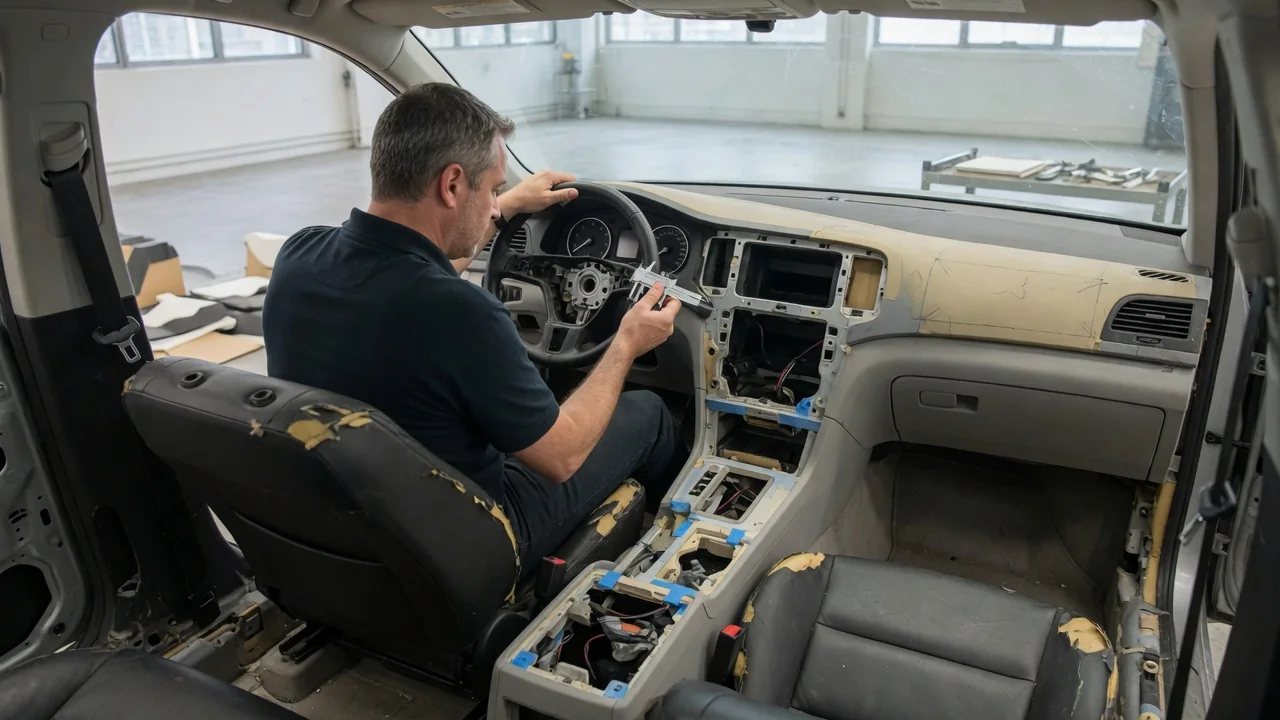
A prototype instrument panel is where styling, ergonomics, electronics, and manufacturing first come together in physical form. Before a dashboard design is approved for production, engineering teams check three things. Drivers need to see what matters. They need to operate controls without strain or confusion. And the panel has to be built and serviced consistently. Dashboard prototype evaluation usually starts with digital models and simple bucks and moves toward more complete physical builds. Each stage catches problems the previous one could not reveal.
Visibility: Sightlines, Readability, and Reflections
Visibility work starts with the driver's eye position. Engineers model a range of seated positions, typically with manikins or digital human models that cover smaller and larger occupants. They trace sightlines from the eyes over the steering wheel rim and through the spokes to the gauge cluster. If the rim or a stalk hides a speedometer reading or a warning light for some drivers, something has to change, such as the cluster position, the wheel geometry, or the display layout. The same studies check the upper surface of the panel, often called the top pad. Its height and shape affect how much of the road ahead the driver can see over the hood.
Readability is the next layer. Evaluators look at character size, contrast, font choice, and how information is grouped. The goal is for the most important items, such as speed and critical warnings, to be readable at a short glance. Displays and illuminated graphics are checked in lighting from direct sunlight to complete darkness. A screen that looks crisp in a studio can wash out in daylight or become too bright at night. Reviewers also check dimming behavior and whether backlight color stays consistent across panel elements.
Reflections are a common finding that often appears only in a physical or high-fidelity virtual setup. A glossy trim strip or a bright display can reflect in the windshield or side glass, creating distracting images at night or glare during the day. Teams also check whether the dash surface itself reflects onto the windshield in sunlight. This is one reason upper dash surfaces tend to use darker, low-gloss materials. Findings here often lead to changes in surface grain, display angle, or the shape of the hood over the instrument cluster.
Interaction: Reach, Feel, and Driver Workload
Interaction evaluation asks whether the intended range of drivers, and front passengers where relevant, can reach and use the controls comfortably. Reach studies confirm that switches, knobs, touchscreens, and storage areas fall within a comfortable arm envelope. The driver should not have to lean away from the seatback. Clearance is checked too. Knees should not contact the lower panel. Hands moving between the wheel and the center stack should not hit gear selectors, cupholders, or trim edges.
Feel and feedback matter as much as location. On physical prototypes, evaluators judge operating force, travel, detent quality, and the sound a switch makes, because these cues tell the driver an input registered. Touch controls are reviewed for target size, spacing, and response time. Reviewers also note whether confirmation is visual, audible, or haptic. Early prototypes may use 3D-printed or hand-finished switches that do not yet feel like production parts. Teams therefore note which impressions to recheck once production-intent parts are available.
Distraction and workload are evaluated through task-based reviews. Participants may be asked to change climate settings, adjust audio, or find a function in a menu while evaluators observe their glances and completion time, sometimes in a driving simulator. The aim is to confirm that common tasks need only brief glances and shallow menus. Reviewers also check that labels and icons are understood without explanation. Results feed into layout changes and software menu revisions. They also inform whether certain functions stay on dedicated physical controls.
Assembly: Fit, Finish, and Buildability
An instrument panel is a large assembly built from many parts. These include a structural cross-car beam, the panel substrate and skin, air ducts, wiring harnesses, the cluster, infotainment hardware, airbag modules, vents, and trim. Assembly evaluation checks whether these parts can be installed in a sensible sequence on the production line. Often the whole panel is loaded into the vehicle as a module through the door opening. Prototype builds show whether standard tools can reach the fasteners and whether connectors can be seated and verified. They also show whether harness routing avoids pinch points and sharp edges.
Fit and finish are reviewed by eye and by touch. Inspectors check gaps and flushness between neighboring parts and the alignment of trim lines across the panel and into the doors. They also compare color and grain between materials from different suppliers and inspect edges that occupants will see or touch. Early prototype parts may come from soft tooling, machining, or additive manufacturing, so their tolerances can differ from production tooling. Findings are therefore sorted into true design issues and artifacts of the prototype process.
Squeaks and rattles are another assembly concern. Panels are typically tested on rough-road drives or vibration rigs, sometimes across temperature changes. These tests find buzzes caused by parts touching, loose clips, or materials rubbing together. Serviceability is assessed at the same time. Technicians check whether common repairs can be done without removing the entire dashboard, such as replacing a display, a switch bank, or a blend-door actuator behind the panel.
Practical Implications and Limits
For drivers, the results of this process show up in details that are easy to take for granted. A warning light is never hidden behind the wheel. A volume knob can be found without looking. A dashboard stays quiet on broken pavement years later. Evaluation also explains some design compromises. A higher-mounted display may be easier to read but can add reflections. Moving controls into a screen can simplify assembly but may increase glance time for some tasks. The final panel reflects trade-offs among visibility, interaction, cost, weight, safety requirements, and manufacturing constraints rather than a single ideal.
Prototype evaluation also has limits. Test participants and simulated tasks cannot cover every body size, driving habit, or road condition. Impressions from early parts may change once production materials and tooling arrive. Long-term effects such as material aging, UV exposure, and clips loosening over many years are typically handled by separate durability testing rather than short prototype reviews. Exact methods, criteria, and sign-off steps differ between manufacturers and vehicle programs. Owners who need model-specific details, such as how to remove a particular dash panel, should rely on the service manual for their vehicle.