What Is a Front Parking Camera For?
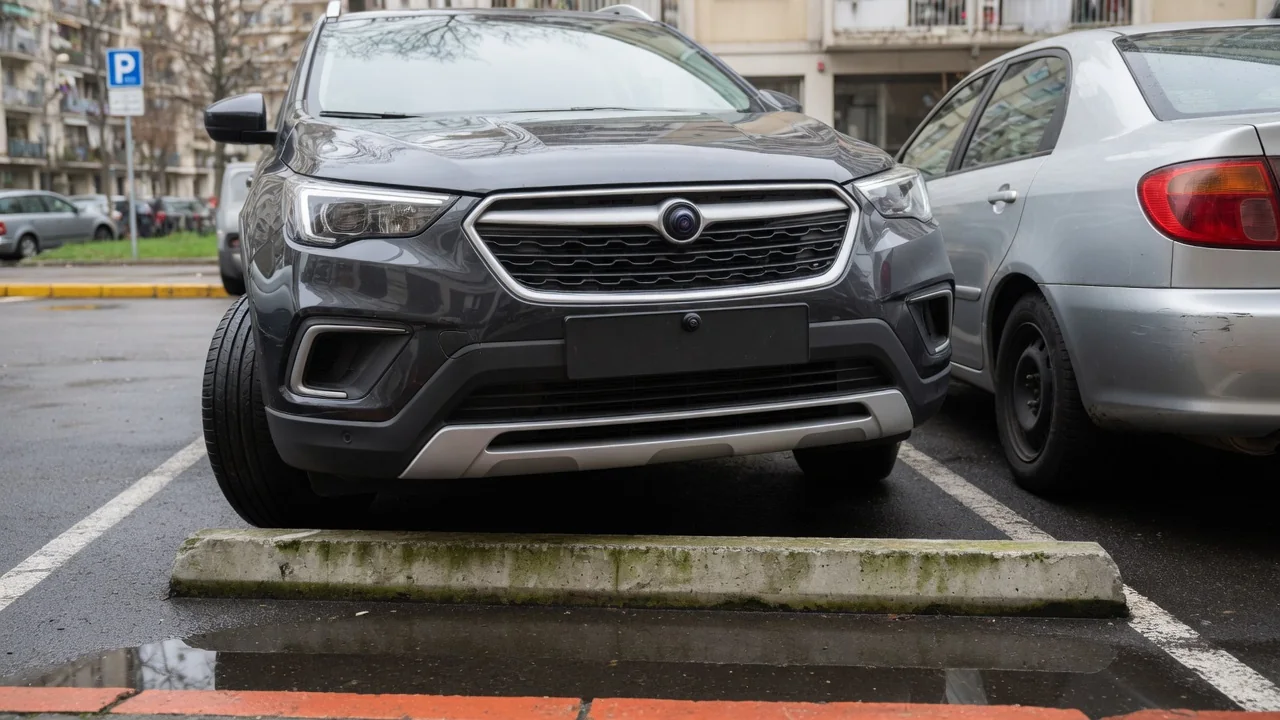
Anyone asking what is a front parking camera for is usually looking at a hood that hides more than expected. The camera shows the strip of ground immediately ahead of the bumper, the area a driver cannot see from the seat, so curbs, parking blocks, posts and walls can be judged during slow maneuvers instead of guessed at through the windshield.
Where it helps
The camera earns its place whenever the nose of the vehicle is creeping toward something low. Pulling head-first into a parking space, a concrete wheel stop or raised curb disappears below the hood line well before the bumper reaches it. On screen, the driver can watch the gap shrink and stop with a small margin, rather than relying on memory of where the obstacle was. The same applies to garage walls, storage shelves, and bollards that sit below the sightline.
Tall trucks and SUVs benefit most because a high hood creates a longer hidden zone, but low cars with long overhangs and vulnerable front splitters gain too. Some vehicles add a wide-angle or split view that looks sideways from the bumper, which helps when nosing out of an alley or between parked vans where cross traffic and pedestrians are hidden. Whether that view exists, and how it is selected, depends on the make, trim, and option package.
Image limits
A front camera uses a wide-angle lens, and that shapes everything on the display. Straight lines bow near the edges, and objects in the center look farther away than they are, so a post that seems a comfortable distance off may be close to the bumper. Colored guide lines, where fitted, give a rough sense of scale, yet they are drawn for flat ground and become misleading on a ramp, a steep driveway apron, or uneven gravel.
Light also limits the picture. Low sun aimed at the lens can wash out the image, while a dim garage produces grain that hides a dark curb against dark pavement. Headlight glare reflecting off a wet wall can do the same. Thin objects such as chains, rebar, or a narrow sign post may barely register, and anything above the camera's field, like a protruding loading dock or a low tree branch, will not appear at all. Mounting height and lens angle differ between vehicles.
Cleaning
The lens sits in the grille, emblem, or lower bumper, directly in the path of road spray, insects, salt, and dust, so it gets dirty faster than a rear camera on many vehicles. A hazy, smeared, or partly blocked image is usually the first sign. Water droplets create bright blurred spots, dried salt leaves a milky film, and a single bug strike can hide exactly the part of the view where the curb would be.
Gentle cleaning is normally enough: rinse off grit first, then wipe with a soft, damp microfiber cloth so that trapped particles are not dragged across the lens cover. Abrasive pads, harsh solvents, and scraping ice with a hard tool can scratch the surface and permanently soften the picture. Some vehicles have a built-in washer nozzle for the camera, and the owner's manual explains whether one is fitted and how it operates. Checking the lens during routine washing keeps the view dependable.
Everyday Use and Observations
In daily driving the camera typically appears on the central screen at walking pace, either automatically when parking sensors detect something close, after shifting out of reverse, or when the driver presses a camera button. Many systems switch the view off above a low speed, because it is intended for maneuvering, not driving. Owners can learn their own setup by trying it in an empty lot and noting when the image appears and when it drops away.
A useful habit is calibrating the picture against reality. Stop with the screen showing a painted line or curb near the bumper, then step out and look at the true gap. Doing this once or twice reveals how the display compresses distance on that particular vehicle. Drivers also notice that the image works best alongside parking sensor tones and a direct look through the windshield, since each covers what the others miss, particularly at the bumper corners.
Limits and Next Steps
The camera is a viewing aid, and it does not brake, steer, or guarantee that the path is clear. A child, pet, or shopping cart can enter from the side after the driver has glanced at the screen, and the corners of the bumper often fall outside the frame. Moving slowly, keeping a foot ready over the brake, and checking mirrors and windows remain the foundation of safe parking, with the display filling in the hidden strip ahead.
If the image stays black, flickers, shows a blue screen, or remains blurred after cleaning, the cause could be anything from moisture behind the lens to wiring, a connector, or a software setting, so a warning message or stored fault code should be treated as a clue and not a verdict on any single part. A front-end bump or bumper repair can also shift the camera's aim. A qualified technician with vehicle-specific information can confirm the cause and whether recalibration is needed.