Why Do Parking Camera Lines Move With the Steering Wheel?
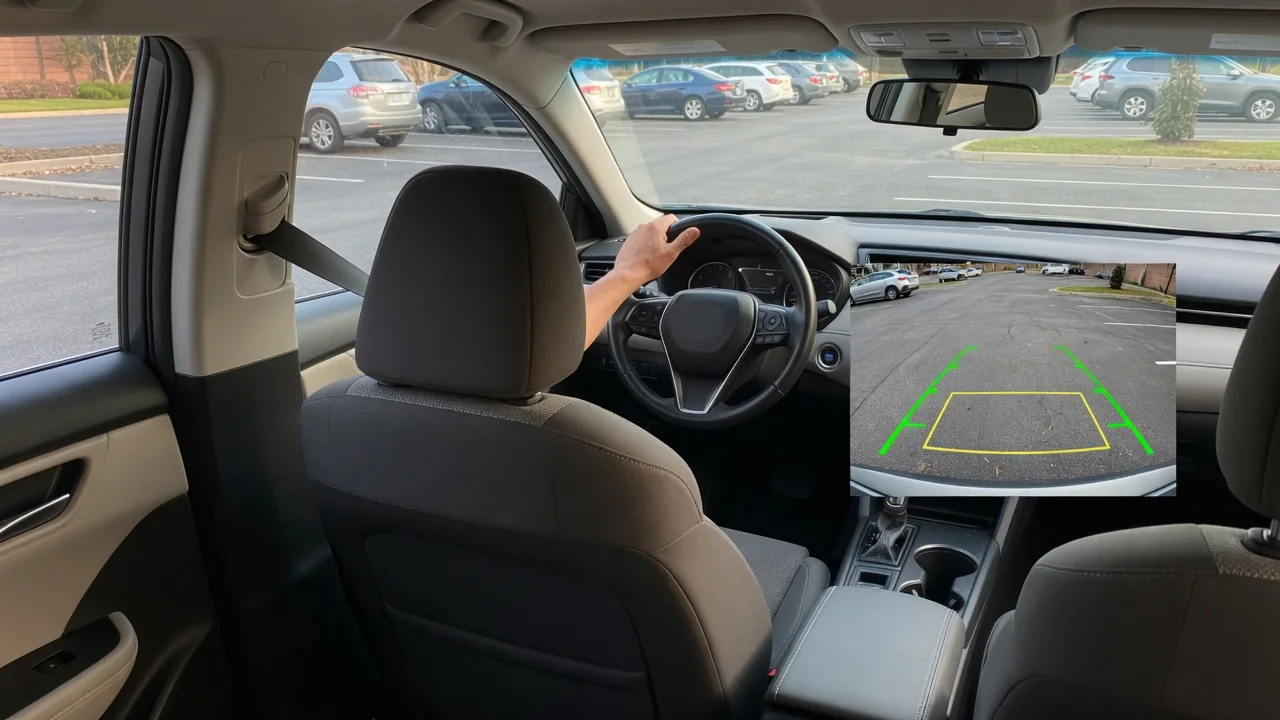
Many drivers notice that the colored guidelines on a backup camera screen bend left or right as they turn the wheel, and wonder why parking camera lines move with the steering wheel at all. The short answer is that the car is drawing a forecast of where it will travel in reverse, based on how far the front wheels are currently turned.
Steering input
Dynamic guidelines begin with a measurement the vehicle already collects for other purposes. A steering angle sensor, typically mounted in the steering column or within the electric power steering system, reports how far and in which direction the wheel has been turned. Stability control and lane-keeping features rely on that same signal. When reverse is selected, the camera system or infotainment unit reads the angle from the vehicle's data network and uses it to shape the overlay drawn on top of the live image.
On the screen, the effect is easy to see. With the wheel centered, the lines run straight back and appear to narrow with distance. Turn the wheel a little and they curve gently; turn it to full lock and they sweep into a tight arc. The lines usually respond while the car is stationary, because they follow the sensor rather than actual movement. Some vehicles show only fixed lines that never bend, and others display both fixed and moving sets together, depending on trim level and camera hardware.
Predicted path
The curved lines represent a projected vehicle path, not a recording of anything the camera sees. Software combines the steering angle with stored figures such as wheelbase and body width to estimate the arc the car would follow if the wheel were held in that position. Because a car steers with its front wheels, the rear end swings around a turning center off to one side, and the overlay traces that curve outward from the rear bumper across the image of the ground.
This explains why the two lines look different in a turn. The side on the inside of the curve follows a tighter arc than the outside, so the pair resembles a bent corridor roughly as wide as the vehicle. Many systems add color bands or cross marks to suggest distance from the bumper, though what each color means differs between manufacturers. The owner's manual for the specific vehicle is the reliable place to confirm how far each marker is intended to represent.
Verify surroundings
A projected path is a geometric estimate laid over a flat picture, and it knows nothing about what actually sits behind the car. The overlay will draw straight through a shopping cart, a post, or a child's bicycle without changing shape. Wide-angle lenses also distort the image, stretching objects near the edges and making distances harder to judge. For that reason, the guidelines work best as a steering reference rather than a statement that the space behind the vehicle is clear.
Mirrors and a look over the shoulder still matter before and during any reversing maneuver. The camera sits low on the tailgate or trunk lid and cannot show the front corners, which swing wide as the rear follows the curved lines into a space. Objects hanging above the ground, such as a trailer tongue or a protruding truck bed, may sit higher than the ground-level lines suggest. Parking sensors and cross-traffic alerts, where fitted, add information but do not replace a direct check.
Everyday Use and Observations
In daily driving, the moving lines are most useful for lining up before the car rolls. When backing into a bay, a driver can turn the wheel until the curved corridor ends between the painted markings, then reverse slowly while making small corrections. During parallel parking, the outer line shows whether the rear corner is heading toward the curb or the car behind. Drivers hitching a trailer often use a center line, where one is provided, to aim the hitch ball at the coupler.
A few habits improve what the screen shows. A lens coated in road grime, salt, or rain droplets blurs the image and makes the lines harder to relate to real objects, so wiping it is worthwhile. Slopes and uneven ground can throw off the apparent distances, since the overlay assumes a level surface. A heavily loaded cargo area or a trailer on the hitch may tilt the body and shift the camera's aim slightly. Some vehicles let the driver switch guidelines on or off in the display settings.
Limits and Next Steps
The prediction holds only as long as its assumptions do. It assumes the wheel stays at its current angle, the tires grip without sliding, and the stored dimensions match the car. Aftermarket wheels, altered ride height, or a replacement camera mounted at a different angle can leave the overlay slightly out of step with reality. Lines that stay crooked with the wheel centered, stop moving entirely, or drift to one side often point to a calibration issue rather than a problem with the camera image itself.
Such behavior sometimes appears after a battery disconnection, wheel alignment, steering repair, or rear body work, because the steering angle sensor or camera may need to be recalibrated. Reset methods vary widely by manufacturer, so vehicle-specific service information should guide the next move. If a warning light or stored fault code accompanies the symptom, it is a clue to investigate, not confirmation that a particular part has failed. A qualified technician with the appropriate scan equipment can verify the sensor reading and restore the guidelines properly.