Key Fob Still Not Working After Battery Replacement: Causes and What to Check
If you changed the battery in your key fob and it still isn't working, the cause is usually simple: the wrong battery, a battery installed upside down, a contact that isn't touching, or a case that didn't close fully. Less often, the fob has lost its pairing with the vehicle, the electronics are damaged, or the problem is on the car's side rather than in the fob. This guide explains how to tell these apart and which checks to do first.
The short answer
A new battery only fixes a fob whose sole problem was a weak battery. If the remote still won't lock or unlock the doors, start by checking the battery and how it was installed. Then confirm whether the fob has a physical fault, whether it needs to be resynchronized or reprogrammed, and whether the vehicle itself is receiving the signal. Most cases are resolved at the battery and installation stage.
It also helps to know what kind of fob you have, because the term covers different systems. On many vehicles, the remote transmitter that locks and unlocks the doors is separate from the immobilizer transponder chip that lets the engine start. On vehicles with keyless entry and push-button start, one fob handles both functions. A fob can fail at one job and still do the other, and that difference narrows down the cause.
Check the battery itself first
Battery type: Compare the code printed on the new battery with the code on the old one. Coin cells such as CR2032, CR2025 and CR2016 look almost identical but differ in thickness. A thinner cell may not make firm contact, and a thicker one may stop the case from closing. Orientation: Most coin cells must go in with the positive (+) side facing a specific direction, often marked inside the fob. A battery that is upside down will not power the fob. Protective film: Some new batteries have a clear plastic sticker on one face. If it isn't removed, it blocks the electrical connection. Freshness: New batteries can be weak or dead if they are old stock or were stored badly. If you have a multimeter, check the voltage, or try a second battery from a different package. Fingerprints and residue: Oil from your fingers can interfere with contact. Handle the battery by its edges, and wipe it with a clean, dry cloth if needed.
Inspect the contacts and the case
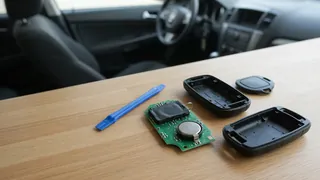
Open the fob again and look at the metal battery contacts. They are often thin spring tabs that get bent flat during battery changes, especially if a screwdriver or knife was used to pry the case apart. If a tab looks flattened, you can lift it slightly with a plastic tool so it presses against the battery. Check for corrosion as well, which shows up as a white, green or dark deposit. Light residue can sometimes be cleaned off carefully, but heavy corrosion usually means moisture has damaged the circuit.
Make sure the two halves of the case snap together completely and evenly. A slightly open seam can leave the battery loose or keep the buttons from reaching the switches underneath. Also check that the rubber button pad sits correctly. If it shifted while the fob was open, pressing a button may not activate the switch on the circuit board.
Look for damage done during the battery change
Prying a fob open can crack the circuit board, break a solder joint, or knock loose a small component. Look closely at the board for cracks, lifted parts, or a battery holder that has come away from the board. Many fobs also have an LED that flashes when a button is pressed. If it lit up before the battery change and stays dark now, even with a confirmed good battery, the fob is probably not getting power or has been damaged. Physical damage like this generally needs a repair or a replacement fob.
Decide whether the fob needs to be resynced or reprogrammed
On most modern vehicles, the fob keeps its pairing when the battery is removed, so a battery change alone should not erase it. Some vehicles, however, may need the remote resynchronized afterward, particularly if the battery was out for a long time or the buttons were pressed while it was out. The procedure depends on the make, model and model year. It may be as simple as pressing a button or cycling the ignition while the fob is near the car, or it may require dealer or locksmith equipment. The owner's manual is the usual place to find whether a simple resync exists for your vehicle.
Resyncing is different from key programming. Programming registers a new or replacement fob with the vehicle's computer and, on most vehicles, also pairs the immobilizer transponder. It is normally done by a dealer or an automotive locksmith with diagnostic tools. Because programming gives a fob the ability to unlock and start the car, they will usually ask for proof of ownership, such as the registration or title along with identification.
Rule out problems on the vehicle side
Sometimes the fob is fine and the car isn't responding. If you have a spare fob, try it. If the spare works, the problem is in the original fob. If neither one works, look at the vehicle.
A weak or dead 12-volt vehicle battery can stop the car from responding to the remote, even if interior lights still come on faintly. Radio interference near some buildings, transmitters or parking structures can block the signal for a while. Try the fob somewhere else, or from closer to the car. A fault in the vehicle's receiver, body control module or door lock actuators can make the remote seem dead. A clue is when one door still locks and others don't, or when the car responds now and then. Aftermarket alarms or remote-start systems sometimes use their own transmitters and have separate programming.
Match the symptom to the likely cause
Symptom | Likely cause | Next step; No LED and no response at all | Wrong or dead battery, upside-down battery, film left on, bent contacts | Recheck the battery code, orientation and contacts; try another battery; LED flashes but the car does not respond | Lost pairing, vehicle-side fault, interference, weak car battery | Try a spare fob, move closer, check the car battery, look up resync steps; Works only from very close range | Weak battery, poor contact, interference, worn transmitter | Try a fresh battery from a new package; test in a different location; Some buttons work, others don't | Misaligned button pad, worn switch, board damage | Reseat the button pad; inspect the switches and board; Remote fails but the engine still starts | Remote transmitter issue; immobilizer chip still recognized | Focus on the battery, contacts and remote pairing; Remote works but the engine won't start | Immobilizer or transponder issue, or a starting problem unrelated to the fob | Try a spare key; have the immobilizer system checked
How to get in and start the car meanwhile
Most fobs contain a mechanical key, which usually slides or releases out of the fob body. It can unlock the driver's door, even if the lock cylinder is hidden behind a small cover on the door handle. Opening the door with the key may set off the alarm until the car recognizes the fob.
Many push-button start vehicles have a backup way to start with a fob that isn't transmitting. Typically you hold the fob against the start button or place it in a marked spot in the console, so the car can read the passive chip without a working battery. The exact location varies by vehicle. If you can't get in or start the car and none of these options work, roadside assistance through your insurer, auto club or vehicle warranty can usually help with lockouts or towing.
A sensible order of checks
1) Confirm the new battery matches the code on the old one and has no protective film. 2) Reinstall the battery with the correct side facing up and handle it by the edges. 3) Inspect the contacts for bending or corrosion and make sure the case and button pad are fully seated. 4) Try a second new battery from a different package. 5) Test a spare fob, if you have one, to tell a fob problem from a vehicle problem. 6) Check the vehicle's 12-volt battery and try the fob in a different location. 7) Look up whether your vehicle has a simple resync procedure. 8) If the fob still doesn't work, have a dealer or automotive locksmith diagnose it, repair it, or program a replacement.
Working through these steps in order handles the most common and cheapest causes first. You only need professional help once the battery, contacts and vehicle-side checks are ruled out.