How to Change a Key Fob Battery
On most cars you can change a key fob battery yourself in a few minutes. Open the fob's plastic case, note which way the old coin cell faces, swap in a new cell of the same type, close the case, and test the buttons. Most fobs need no special tools beyond a small flat blade or a coin, and most keep their programming through a battery change. Two things can change that answer: some fobs are sealed or unusually built, and a small number of vehicles need a resynchronization step after the battery is replaced. Your owner's manual is the authority for your exact key. In this guide, "key fob" means the remote transmitter that locks and unlocks the doors and, on many vehicles, lets you start the car with a push button. It is a separate system from the engine immobilizer, which checks a coded chip in the key before the engine will run. A weak fob battery usually affects the remote functions first, which is why the car may still start when the key is held in a specific backup position.
Signs the Fob Battery Is Running Low
You have to stand closer to the car before the lock or unlock buttons work. You need to press a button several times before the car responds. A "key battery low" or "key not detected" message appears on the dashboard. Keyless entry or push-button start works only some of the time. The small LED on the fob, if it has one, is dim or no longer flashes.
If the fob stops working suddenly and a new battery does not fix it, the cause may be damage to the fob, a programming problem, or an issue with the car. Those cases are covered further down.
What You Need
A replacement battery of the same type as the one in your fob; A small flat-blade screwdriver, a plastic pry tool, or a coin, depending on how the case opens; A small Phillips or Torx screwdriver, if your fob case is held together by a screw; A soft cloth or towel to work on, so small parts do not roll away; Your owner's manual, if available, for your fob's opening method and battery type
How to Identify the Right Battery
Most key fobs use a flat lithium coin cell. The battery's code is printed on its face, for example a code beginning with "CR" followed by digits. The digits describe the cell's diameter and thickness, so a cell with a different code may not fit or make proper contact, even if it looks similar. The reliable approach is to open the fob first, read the code on the old battery, and buy that exact type. The owner's manual usually lists it too.
Some fobs hold two stacked cells, and a few vehicles use a rechargeable fob or a battery type other than a coin cell. If what you find inside does not match the common layout, check the manual before buying a replacement.
How to Change the Battery in a Key Fob, Step by Step
1) Remove the Mechanical Key, If There Is One
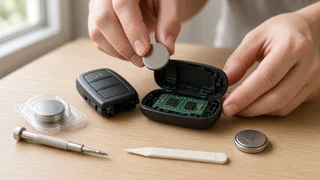
Many fobs, especially for push-button-start cars, hide a metal emergency key inside the case. Look for a small slide or press-button release, then pull the mechanical key out. On many designs, removing it exposes the slot you use to separate the two halves of the case.
2) Open the Case
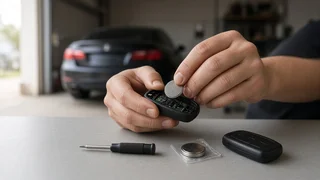
Find the seam where the two halves of the fob meet. Look for a small notch, a slot exposed by the removed key, or a screw on the back. Remove any screw first. Then insert a flat blade, plastic pry tool, or the edge of a coin into the notch and twist gently to pop the halves apart. Work slowly around the seam rather than forcing one spot. Metal tools can scratch or crack the plastic and bend the clips, and a cracked case may let in moisture later. Wrapping the tip of a screwdriver in a thin cloth reduces marring. On a switchblade-style flip key, the battery is usually in the remote section, and the case may separate differently from a solid fob.
Stop if the case will not open with moderate pressure. Some fobs are sealed or need a specific sequence to open. Check the manual, or ask a dealer or automotive locksmith rather than breaking the housing.
3) Note the Battery's Orientation
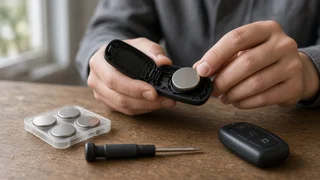
Before removing anything, look at which side of the old battery faces up. The positive side is usually marked with a plus sign and the battery code. Take a quick photo if it helps. Fitting the new cell upside down is one of the most common reasons a fob still does not work after a battery change.
4) Remove the Old Battery
Slide the battery out from under its retaining clip, or gently lift it with a plastic tool or fingernail. Avoid prying against the circuit board, its components, or the metal contacts. A bent contact can lose touch with the new battery, and a scratched board can stop the fob working entirely. Try not to touch the rubber button pad or the board with greasy fingers.
Coin cells are a serious hazard if swallowed, particularly for young children and pets. A swallowed battery can cause severe internal injury quickly. Put the old battery out of reach right away and keep new batteries in their packaging until you use them. If you suspect a child has swallowed one, seek emergency medical help immediately.
5) Insert the New Battery
Handle the new cell by its edges, since skin oils on the flat faces can affect contact. Place it in the holder with the same side facing up as the old one, and press it under the clip until it sits flat and secure. Make sure any rubber seal or button membrane is back in its original position.
6) Close the Case
Line up the two halves and press them together around the edges until each clip snaps into place. There should be no visible gap along the seam. Refit any screw, then slide the mechanical key back into its slot until it locks.
7) Test the Fob
Stand at a normal distance from the car and try lock, unlock, and any other buttons, such as trunk release or panic. If your car has keyless entry, try opening the door with the fob in your pocket, then check that the car starts normally. The job is complete when every function works on the first press from your usual distance and no low-battery warning appears on the dashboard.
If the Fob Still Doesn't Work After the Battery Change
Reopen the case and confirm the battery is the correct type and faces the right way. Check that the battery sits flat and that the contact under it is not bent away or dirty. Make sure the new battery is actually fresh; batteries lose charge in storage, and an old stock cell may already be weak. Confirm the case is fully closed and the buttons press cleanly against the board. Check the owner's manual for a resynchronization procedure; some vehicles require one after a battery change, typically a simple sequence with the key or buttons. Try your spare fob; if it also fails, the problem may be with the car's receiver or electrical system rather than the fob.
If none of these help, the fob may be damaged or may have lost its pairing with the car. Restoring it then usually means key programming with dedicated equipment, which a dealer or a qualified automotive locksmith can do. Expect to be asked for proof of ownership, such as your registration or title and photo ID, before any key is programmed or cut. This is a standard anti-theft precaution.
Getting Into and Starting the Car With a Dead Fob
A dead fob battery does not have to leave you stranded. Use the mechanical key to unlock the driver's door. On many cars the key cylinder is hidden under a small cover on the door handle. Opening the door this way may set off the alarm until the car is started.
Many push-button-start vehicles can still start with a dead fob. The car reads the immobilizer chip at short range, but you must hold the fob in a specific spot. Depending on the vehicle, you may need to touch it to the start button, place it in a marked slot or pocket, or hold it near a marked area on the steering column or console. The owner's manual shows the location for your model. If you cannot get in or start the car, roadside assistance through your insurer, motor club, or vehicle warranty can help.
Tips to Avoid Being Caught Out
Replace the battery as soon as range starts dropping, rather than waiting for it to fail completely. Keep a spare battery of the correct type at home, out of children's reach. When you replace one fob's battery, consider doing the spare fob as well. Keep the fob away from water, heat, and strong impacts, which can damage the case seals and electronics. Recycle old lithium coin cells through a battery collection point rather than throwing them in household trash, following your local rules.