How to Change a MINI Key Fob Battery

The Short Answer
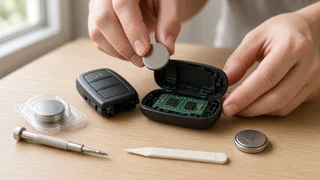
On most MINI remote keys with a user-replaceable battery, the job is a cover-off, cell-out, cell-in swap. Remove the emergency mechanical key if your fob has one, open the battery cover or case, note which way the old coin cell faces, fit an identical new cell the same way, close the case, and test the lock and unlock buttons. A key fob is the handheld remote that locks, unlocks and, on keyless-equipped cars, allows the vehicle to recognize the key for starting.
One condition changes this answer. MINI has used different key designs across model generations, and some earlier keys use a rechargeable battery that charges while the key sits in the ignition slot instead of a coin cell meant for owner replacement. If your owner's manual describes your key that way, do not force the case open; a MINI dealer or qualified automotive key specialist is the appropriate next step.
Before You Start
No model-specific battery specification was confirmed for this guide, so identify the correct cell from your own key rather than relying on a general assumption. The battery code is printed on the face of the existing cell, and the battery section of your owner's manual should list the type and the opening method for your key. Buy the exact same code; a cell with a different code may differ in thickness or voltage and may not fit or work.
What you will need: • A replacement battery matching the code printed on the old cell or listed in your owner's manual; • A plastic pry tool, a thin coin, or a small flat-blade screwdriver wrapped in tape to reduce scratching; • A clean, dry, well-lit surface; • Your owner's manual for your model year
Step-by-Step Battery Replacement
1) Confirm your key type. Check the owner's manual to see whether your key has a replaceable coin cell. If it describes a rechargeable battery that charges in the ignition, stop here and seek dealer or specialist service. 2) Release the emergency key. Many remote keys contain a mechanical key blade held by a release button or slide. Remove it; on many designs this exposes the gap or slot used to open the battery cover. 3) Open the cover or case. Insert the plastic tool or coin into the designated slot and twist or lever gently. Stop if the case resists strongly or you cannot find a slot; forcing it can crack the housing or break internal clips. 4) Note the battery orientation. Before removing the old cell, check which side faces up. The positive side of a coin cell is usually marked with a plus sign. 5) Remove the old battery. Lift it out with a fingernail or plastic tool. Avoid prying against the circuit board or bending the metal contacts that hold the cell. 6) Fit the new battery. Handle it by its edges to keep skin oils off the contact surfaces, and seat it with the same orientation as the old one. 7) Reassemble the key. Refit the cover or press the case halves together until they close evenly all the way around, then reinsert the emergency key blade. 8) Dispose of the old cell responsibly. Follow local battery recycling or disposal rules.
Safety note: coin cell batteries are a serious hazard if swallowed, particularly by young children. Keep new and used cells out of reach throughout the job and store the spare in its original packaging.
Checking That It Worked
Stand near the car and press lock, then unlock. The car should respond the way it normally does. If your MINI has keyless entry or keyless start, also confirm that the car recognizes the key when you try to start it as usual. A noticeable improvement in operating range compared with before the swap is a good sign the old battery was the cause.
If the Remote Still Does Not Work
• Open the key again and check that the battery is the correct type, faces the right way and is firmly seated against its contacts. • Make sure the case is fully closed, since an uneven seam can keep the cell from making contact. • Check the owner's manual for any resynchronization step for your model. This guide could not confirm whether one applies to a given MINI generation, so do not assume either way. • If the key still fails, have a MINI dealer or qualified key specialist check it. The fault may be in the key electronics or its coding to the car rather than the battery.
If the key battery is dead and you need to drive before replacing it, your owner's manual explains the backup method for your model, such as using the mechanical key blade to open the door and any emergency starting procedure. These procedures vary by vehicle, so follow the manual for your specific car.
Limits of This Guide
This guide covers the general procedure for replacing a battery in a MINI remote key. It does not confirm the battery code, the case-opening method, or any resynchronization requirement for a particular model year, generation or market, because no verified model-specific data was available. For those details, rely on the owner's manual for your car or ask a MINI dealer.