Fix Honda Pilot keyless-start no-start
The short answer
Most keyless-start no-starts on a Honda Pilot come from a few common causes. The vehicle may not detect the key fob, the 12-volt battery may be weak, or one of the start conditions isn't being met, such as the brake pedal being pressed firmly with the transmission in Park. Check those first. They're quick, and some can be fixed in the driveway. If the vehicle cranks but won't fire, or a security or engine warning stays on, the cause is probably outside the keyless system and needs a proper diagnosis.
One qualification matters here. Keyless access and push-button start depend on the model year, generation and trim. Some Pilots use a conventional ignition key. Fob design, dashboard messages and backup start procedures also vary between generations. Treat the steps below as general guidance, and confirm the details in the owner's manual for your model year. No model-year-specific service bulletins or measured failure data were available for this guide, so it doesn't claim that any one cause is most common on a particular Pilot.
How the keyless start system decides to start the engine
When you press the ENGINE START/STOP button, the vehicle checks three things. It looks for a valid fob inside the cabin using low-power radio signals. It confirms the immobilizer recognizes that fob, so the engine can run. And it checks the driver's inputs, mainly the brake pedal and the shifter position. If any check fails, the engine won't start. Thinking in these three stages helps you narrow down the problem.
Start by noting what the vehicle does
Before changing anything, press the button once with your foot firmly on the brake and watch what happens. The response points to a likely cause.
What you observe | What it suggests | Next check; Key-not-detected message or similar indicator | The vehicle isn't reading the fob | Try the fob backup start method and replace the fob battery; Dash dark or dim, or a rapid clicking | Weak or discharged 12-volt battery, or poor battery connections | Inspect the terminals and test or jump-start the battery; Dash lights normally but nothing happens when the button is pressed | A start condition isn't being met, or the brake signal isn't reaching the system | Confirm Park, press the brake harder, check whether the brake lights work; Engine cranks but doesn't start | Probably not a keyless-access fault; could be immobilizer, fuel or ignition | Watch the security indicator and have the codes read; Security indicator flashing or staying on after a start attempt | Immobilizer isn't accepting the key | Try a spare fob, then seek professional diagnosis
Check 1: The key fob
A weak fob battery is a common reason the vehicle reports that it can't find the key. The fob may still lock and unlock the doors at close range while being too weak to detect inside the cabin. Many Honda smart fobs use a coin-cell battery. Confirm the battery type printed on the cell or in the owner's manual rather than assuming it.
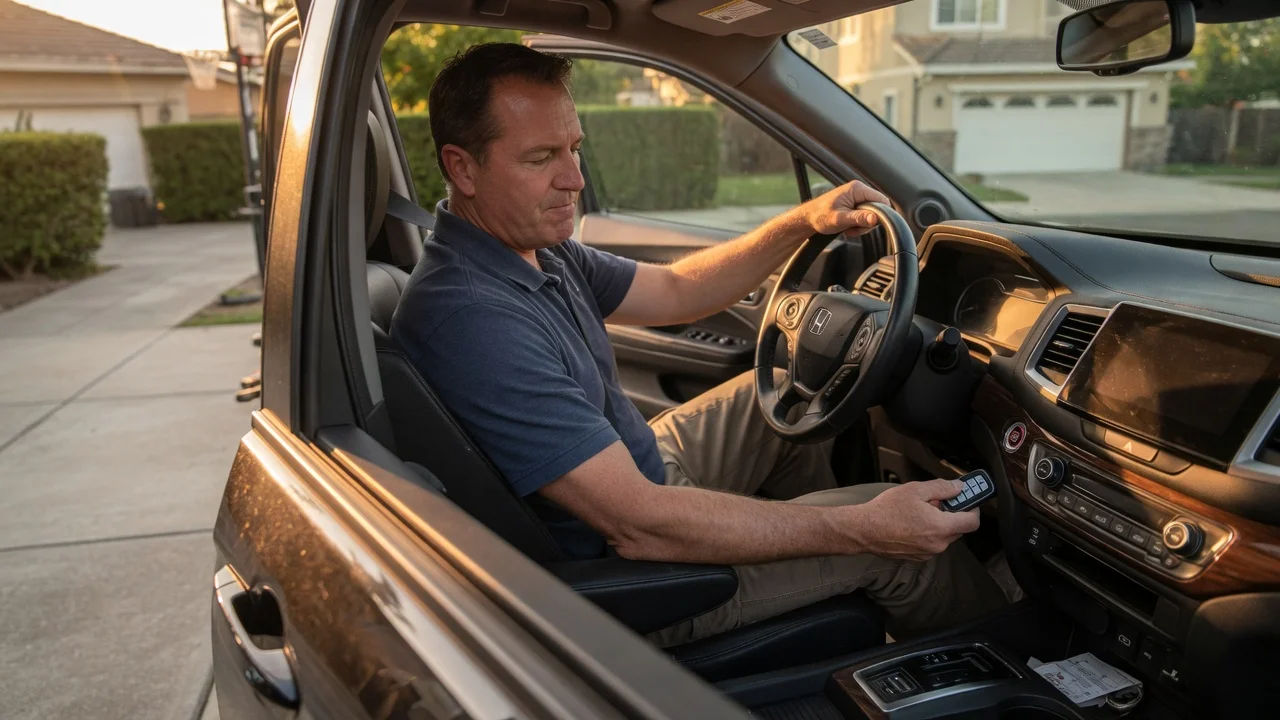
Honda owner's manuals for push-button-start models describe a backup procedure for a weak fob. You typically hold the fob, Honda logo or button side as instructed, against the ENGINE START/STOP button and press the button with the brake applied. The exact method differs by generation, so follow your manual. If the engine starts this way, the fob battery or fob signal is the likely problem, and replacing the battery is the logical next step.
Try the spare fob. If the spare works, the original fob or its battery is at fault. Move phones, chargers, other fobs and electronic accessories away from the fob and console. Radio interference can block detection. Keep the fob inside the cabin, not in the cargo area or an outside pocket, while you try to start. If neither fob works, even with the backup method, look at the vehicle side: the battery, the antennas or the immobilizer.
Check 2: The 12-volt battery and connections
Keyless start depends on several control modules communicating, and low voltage can cause confusing symptoms. These include fob-detection messages, flickering displays and clicking without cranking. Check the battery terminals for corrosion or looseness. If you have a multimeter, measure the resting voltage. A fully charged conventional 12-volt lead-acid battery generally reads about 12.6 volts at rest. A clearly lower reading points to a discharged or failing battery. Compare against the battery maker's specification, because battery types differ.
If a jump-start or a charged battery lets the Pilot start normally, test the battery and charging system. A battery that keeps going flat may be ageing, may not be charging properly, or may be drained by something while the vehicle is parked. Diagnosing a drain usually needs a shop or a methodical current-draw test.
Check 3: Brake pedal and shifter inputs
The system needs to see the brake applied and the transmission in Park before it will start the engine. Press the brake firmly. A light touch may not trigger the switch. Make sure the shifter is fully in Park; on button or lever shifters, select Park again. Shifter designs vary by generation, so check your manual for how Park is confirmed.
A quick way to check the brake signal is to see whether the brake lights come on when the pedal is pressed, using a helper or a reflective surface. If they don't, the brake light switch or its circuit may be faulty. That can stop the start system from seeing the pedal, and it's also a safety issue, because following drivers can't see you braking. Have it repaired before regular driving.
Check 4: Immobilizer and crank-no-start conditions
If the engine cranks but won't run, the keyless access part of the system has probably done its job, and the cause lies elsewhere. Possible causes include the immobilizer rejecting the key, or a fuel, ignition or sensor problem. Watch the security indicator on the dashboard during a start attempt. If a spare fob also fails and the indicator shows a problem, the immobilizer or key programming may need a dealer or qualified locksmith with Honda-capable tools.
Using fault codes correctly
Reading stored diagnostic trouble codes is a useful next step, but a code is evidence to investigate, not proof that a part has failed. Low battery voltage, for example, can set codes in several modules at once. A code naming a sensor or circuit can come from wiring, connectors or power supply rather than the component itself. Note every code and the conditions when it appeared, fix basic issues such as battery health first, then clear the codes and see which ones return. Generic scan tools may not read all Honda body and immobilizer modules, which is one reason dealer-level diagnosis is sometimes needed.
When to stop and get professional help
You smell fuel, burning or hot electrical insulation, or see smoke. The engine cranks repeatedly without starting. Extended cranking can overheat the starter and drain the battery further. The brake lights don't work. The check-engine light flashes, or several warning lights stay on after the vehicle starts. The vehicle starts only with the backup fob method, even after a new fob battery and a test of the spare. Neither fob is recognized, or the security indicator shows an immobilizer fault.
Before booking a repair, it's worth asking a Honda dealer whether any recalls, service bulletins or warranty coverage apply to your Pilot's VIN. A dealer check gives a definitive answer for your specific vehicle.
Suggested order of checks
Press the brake firmly, confirm Park and try again. Try the spare fob and remove nearby electronic interference. Use the fob backup start method from the owner's manual. Replace the fob battery if the backup method works. Inspect the battery terminals and test or jump-start the 12-volt battery. Check that the brake lights work. If the engine cranks without starting or warning indicators persist, have the codes read and the vehicle diagnosed professionally.