Choosing a Pioneer Receiver with Apple CarPlay: What to Check Before You Buy
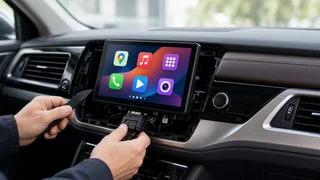
Pioneer sells many aftermarket receivers that support Apple CarPlay, so it is a reasonable choice for adding CarPlay to a car that didn't come with it. Not every Pioneer head unit includes CarPlay, though. Among the ones that do, the main differences are how the iPhone connects, how the unit fits your dashboard, and how well it works with your car's existing controls and electronics. Those three factors affect whether you'll be satisfied more than the brand name does. The answer depends most on your vehicle. A Pioneer Apple CarPlay radio that installs easily in one car may need extra adapters, or may not be practical, in another. This is especially true of newer vehicles where the factory screen also controls climate, vehicle settings or safety features. Check your exact make, model year and trim before you choose a receiver.
Confirm the model actually supports CarPlay
Pioneer groups receivers into product families, often identified by a prefix in the model name. Features can still vary within a family and between model years. Some units are basic digital media receivers with no CarPlay, some have wired CarPlay only, and some support wireless CarPlay. Check the specific model number you plan to buy, not just the series. When you buy used or older stock, confirm that the listing describes that exact unit.
Wired or wireless CarPlay
Wired CarPlay connects through a USB cable. It charges the phone while you drive and usually gives a stable connection. Wireless CarPlay connects over Wi-Fi after the first device pairing over Bluetooth, so short trips are more convenient. Wireless use drains the battery faster unless you also have a charging pad or cable, and a phone that is already low on charge can struggle on long drives.
Factor | Wired CarPlay | Wireless CarPlay; Connection | USB cable to a port routed from the receiver | Bluetooth pairing, then Wi-Fi; Phone charging | Charges while connected | Needs a separate charger or pad; Convenience | Plug in each trip | Connects automatically once paired; Stability | Usually very consistent | Can be affected by interference or phone settings; Cost | Typically found on lower-priced models | Usually found on higher-tier models; Installation | Requires routing a USB extension to an accessible spot | Still benefits from a USB port for charging and updates
If most of your driving is long commutes and you would plug in anyway, wired CarPlay covers the essentials for less money. If you take many short trips or share the car between drivers, wireless convenience may justify paying more.
Dashboard fit: single-DIN, double-DIN and floating screens
DIN is a standard size for radio openings. A double-DIN opening is twice the height of a single-DIN one. Most CarPlay receivers with a built-in screen need a double-DIN space. Floating-screen designs mount a larger display in front of the dash on a single-DIN chassis or a smaller opening. They can solve fit problems, but the screen may block vents, controls or hazard switches in some cars.
Measure or look up your factory radio opening for your exact model year and trim. Check whether a vehicle-specific dash kit exists so the receiver sits flush and looks finished. For floating screens, confirm the display won't cover vents, buttons or a factory screen you still need. Confirm there is room behind the dash for the receiver chassis, the wiring harness and any interface module.
Vehicle integration and interface adapters
Vehicle integration means how well the new receiver connects to the car's existing systems. In older cars this is often simple: power, speakers and an antenna. Many newer cars run audio, steering wheel buttons, chimes and sometimes amplifier control over a data network. In those cars you need an interface adapter, a module that translates between the car and the aftermarket radio.
Steering wheel controls: most Pioneer receivers can accept steering wheel commands through a steering wheel interface module. Check that a compatible module is available for your vehicle, and confirm which buttons will keep working. Factory amplifier or premium audio: branded factory sound systems may need a specific integration adapter to keep the amplifier working and the volume behaving properly. Backup camera: check whether you can keep the factory camera, whether it needs a camera interface, or whether you will add an aftermarket camera. Also confirm the receiver has the camera input you need. Vehicle settings and chimes: in some cars, removing the factory radio also removes access to settings menus, warning chimes or climate displays. Look for an adapter that preserves them, or decide whether you can live without them. Antenna: many vehicles need an antenna adapter to connect to the receiver's tuner. Microphone and USB placement: CarPlay uses Siri for voice control and calls. Plan where the external microphone and USB port will go so they are useful in daily driving.
If your car's factory screen controls climate or other core functions, replacing it may not be practical. Find that out before you spend money on a receiver.
Screen, controls and software compatibility
Look at the screen type and size along with the CarPlay badge. Capacitive touchscreens respond to light touches the way a phone does. Resistive screens need firmer presses and can feel less precise with CarPlay's interface. Resolution, viewing angle and glare all matter, depending on how the screen faces the driver and how much sun the dash gets. Physical volume knobs or buttons can be easier to use while driving than on-screen controls.
Software compatibility also matters over time. Receivers get firmware updates that can fix connection bugs or keep pace with iPhone software changes. Before buying, see whether the model has an update history and how updates are installed, usually through a USB drive. Your iPhone also needs a CarPlay-compatible iOS version. Most current iPhones meet this requirement, but older devices may not.
Features beyond CarPlay
Android Auto support, if anyone else who drives the car uses an Android phone. Preamp outputs and their number, if you plan to add amplifiers or a subwoofer later. Sound tuning such as an equalizer, time alignment and crossover settings, which matter more in upgraded audio systems. Additional camera inputs for front or trailer cameras. Radio options available on the specific model, such as HD Radio or satellite radio readiness. A second USB port or other media inputs, if you want them.
Estimating the total cost
The receiver is usually only part of the cost. Before comparing deals, add up everything your car needs: the dash kit, wiring harness, antenna adapter, steering wheel interface, any data or amplifier integration module, a camera or camera adapter if needed, and professional installation if you won't do the work yourself. A cheaper receiver that needs an expensive integration module can cost more in total than a higher-tier unit in a car that needs few adapters.
When comparing prices, check that each quote covers the same items, comes from the same market and is current. A listed price is not always what buyers end up paying. Installer quotes can differ depending on whether parts, labor and programming of interface modules are included. Ask installers to itemize their quotes so you can compare them fairly.
Which type of Pioneer CarPlay receiver fits your priorities
Lowest total cost in an older, simple car: a wired CarPlay double-DIN receiver with a standard dash kit and harness is usually the most straightforward choice. Daily short trips or several drivers: a wireless CarPlay model is worth considering, paired with a charging solution. Small or unusual dash opening: a floating-screen model can give you a larger display, as long as it doesn't block controls. Plans to upgrade audio: prioritize preamp outputs and tuning features over screen size. Newer car with an integrated factory screen: decide first whether full replacement is practical. If it isn't, ask an installer about integration solutions designed for your vehicle.
Final checks before you buy
The exact model number lists CarPlay, and you know whether it is wired or wireless. A dash kit, harness and antenna adapter are available for your make, model year and trim. You know which steering wheel interface or integration adapter you need and what functions it keeps. You have accounted for the backup camera, factory amplifier and any settings menus. Your iPhone runs a CarPlay-compatible iOS version. Your total budget includes adapters and installation. You understand the warranty terms and the seller's return policy, especially for open-box or used units.
After installation, keep the receiver's firmware up to date and look through the connection settings for CarPlay and Bluetooth. Many connection problems after the first pairing come from settings on the phone or receiver rather than from a hardware fault.