What Is a Vehicle Ergonomics Mockup? Seating, Reach and Feedback Explained
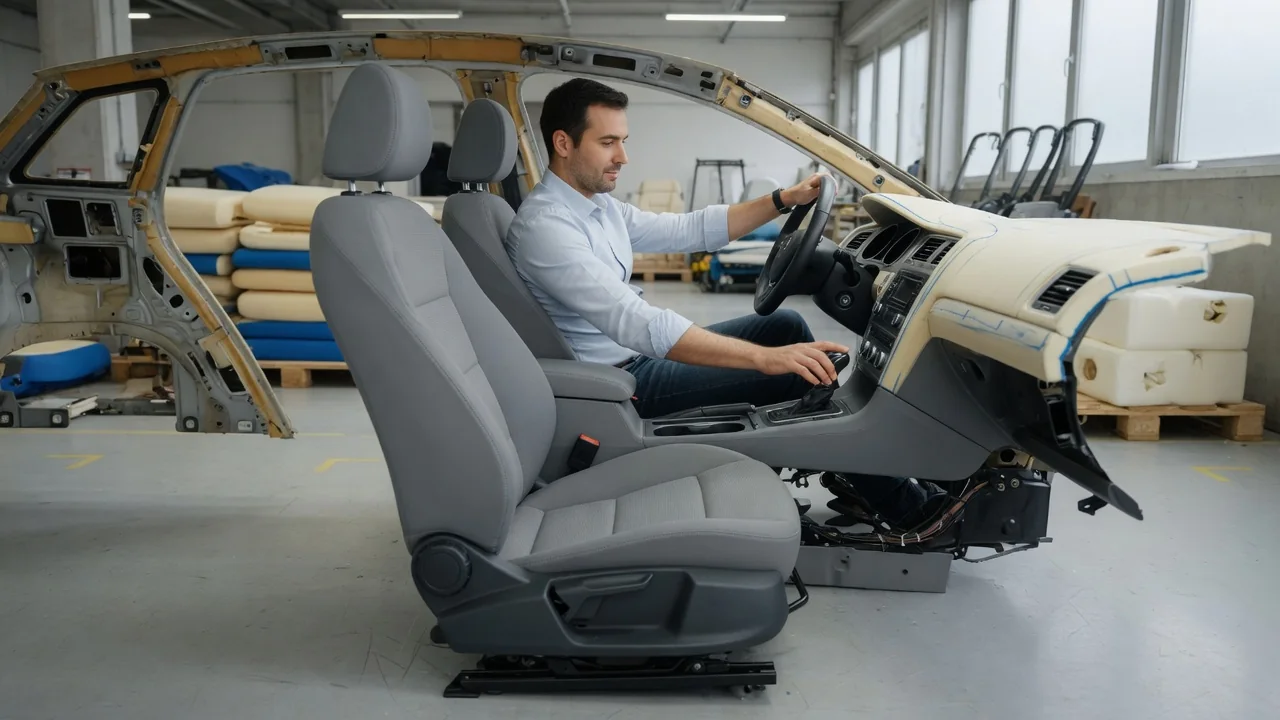
A vehicle ergonomics mockup is a physical, and often partly digital, representation of a car's interior. Engineers build it to check how real people sit, reach, see and operate controls before production tooling is committed. Sometimes called a seating buck or a car ergonomics prototype, it gives up styling and drivetrain in exchange for adjustable geometry. This article explains the three things such a mockup is mainly used to evaluate: seating points, control reach and feedback.
Seating points
Every interior layout starts from a reference position for the occupant. The most widely used reference is the H-point, or hip point. It approximates the pivot between the torso and thigh and is located with a standardized measuring manikin rather than a live person. Designers also define a seating reference point, the intended hip location for the driver's normal rearmost driving position, along with the heel point on the floor, the torso angle and related dimensions. Together these points form the occupant package. The mockup reproduces the floor, seat, pedals, steering wheel, roof line and pillars in the correct relationship to them.
Many ergonomics bucks are adjustable. Seat tracks, cushion height, steering column position and even roof and pillar panels can be moved. This lets the team shift a seating point and immediately see the consequences: headroom, eye position relative to the windshield, the view over the hood and the clearance through the door opening when getting in and out. Measuring a seat with the H-point manikin also confirms that the seat as actually built places the hip where the design intended, because foam density, frame shape and trim can all move the effective position away from the drawing.
Because people vary widely in size, a mockup is usually evaluated with occupants who represent the edges of the intended population, such as small and large body-size percentiles, as well as people in between. The seat adjustment range has to place each of them in a workable posture. Which percentiles and ranges are targeted depends on the manufacturer, the market and the type of vehicle, so there is no single universal setting.
Control reach
Once the seating points are set, the mockup is used to check whether a belted driver in a normal posture can reach and operate the steering wheel, pedals, shifter, parking brake, touchscreen and switches. Planners commonly work with reach envelopes, which describe the zone a given share of drivers can reach with a hand from the seat. Industry recommended practices exist for defining these zones. The envelopes are first overlaid on the digital design, then verified with people sitting in the physical buck.
The physical check often reveals problems a computer model misses. An elbow may hit the door armrest while steering, the wheel rim may hide a stalk, a knee may touch the lower dashboard, or reaching the far corner of a screen may require leaning away from the seatback. Reach is also different from operability. Touching a control is not the same as gripping, turning or pressing it accurately. Pedals get similar attention: lateral offset from the seat centerline, spacing between pedals, travel, the foot movement from accelerator to brake and the width of the footwell all affect how naturally a driver can use them.
Reach studies are not limited to the driver. Mockups are also used to check seat belt buckle access, interior door handles, rear-seat controls and entry and exit for passengers. A common principle is to place frequently used and driving-critical controls closest to the natural hand and foot positions, while less important functions can sit farther away.
Feedback
Feedback in an ergonomics mockup has two meanings. The first is the feedback a control gives to the person using it: the click or detent of a switch, the resistance of a rotary knob, the force and travel of a pedal and the effort at the steering wheel. Early mockups may use simple placeholder parts, while later versions are fitted with representative components. This matters because a physical rig lets evaluators judge whether a control can be found and operated by feel without looking away from the road, which is closely tied to driver distraction. Some rigs connect screens to simulation software so that touch inputs produce realistic visual, sound or vibration responses.
The second meaning is the feedback participants give to engineers. People sit in the mockup and perform scripted tasks such as adjusting the seat, finding a driving position, reaching controls and climbing in and out. They then rate comfort, ease of use and visibility, typically through structured questionnaires. Observers record postures and difficulties, and some studies add tools such as motion capture or seat pressure mapping. Combining subjective ratings with these objective observations gives designers clear direction, and the geometry is adjusted and tested again in repeated cycles.
Virtual reality has become a common companion to the physical buck. A participant can sit in a real seat and hold a real steering wheel while a headset shows a digital dashboard, letting the team swap interior designs without rebuilding hardware. The trade-off is that anything seen only in the virtual scene cannot be touched, so tactile judgments still depend on physical parts.
Practical implications and limits
For car owners, this process helps explain why seat adjustment ranges, tilt and telescoping steering columns and pedal locations look the way they do. They are compromises chosen to fit a defined range of people. Someone whose body proportions fall outside that range may find a car awkward even though it suits most drivers; that reflects a design boundary rather than a defect. For any individual, sitting in the specific vehicle and setting up a real driving position remains the most reliable way to judge fit.
A mockup also has clear limits. A static buck does not reproduce vehicle motion, vibration, road noise, cabin temperature or the fatigue that builds during long drives. Long-term seat comfort, including how cushioning changes with use, has to be assessed in driving prototypes and durability work. Participant groups are finite and may not capture every body type or regional preference. An ergonomics mockup also does not validate crash protection or airbag behavior, which require separate engineering and testing.
How any particular manufacturer uses mockups, which standards it applies and how many design iterations a given model went through vary and are generally not published. The description here covers the general practice, so it should not be read as an account of how a specific vehicle was developed.