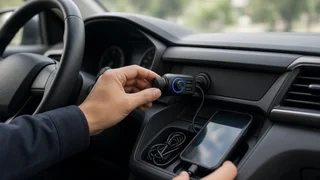
Gizmovine Bluetooth Car Adapter: What to Check Before You Buy
The short answer
A Gizmovine Bluetooth car adapter can be a reasonable way to add wireless music streaming and hands-free calling to a car that lacks built-in Bluetooth. Whether a particular unit suits you depends mainly on one thing: how it connects to your car's audio system. An adapter that plugs into an AUX jack, one that broadcasts over FM radio, and one that uses a cassette deck each behave differently. Pick the wrong type for your dashboard and the adapter won't work well, or won't work at all.
No confirmed specifications, prices or test results for specific Gizmovine models were available for this guide. Treat the points below as a checklist to apply to the exact listing you are considering. Confirm every detail against the product page or packaging before you buy.
Start with your car, not the adapter
Before comparing products, look at your dashboard and center console. These features determine which adapter type makes sense. They can vary by model year, trim level and market, even within the same vehicle nameplate.
3.5 mm AUX input: a headphone-style jack, often labeled AUX, usually found near the stereo, in the center console or inside the armrest. FM radio: present in nearly all factory stereos, but it is the only usable input in many older or base-trim cars. Cassette deck: found in some older vehicles and usable with a cassette-style adapter. 12V accessory socket: the former cigarette lighter, which powers most adapters. Check whether yours stays live with the ignition off, because that affects whether the adapter drains the battery or switches off automatically. USB port: some ports supply only charging power, while others carry audio. A USB port alone does not guarantee that a USB-powered adapter will play sound through the speakers.
Common adapter types and when each fits
Adapter type | How it sends audio | Best suited to | Main trade-off; AUX Bluetooth receiver | Wired 3.5 mm connection to the stereo's AUX input | Cars with an AUX jack | Needs an AUX port; may require separate USB or 12V power; FM transmitter | Broadcasts to an unused FM frequency your radio tunes to | Cars without AUX or factory Bluetooth | Prone to interference and static, especially in cities with crowded radio bands; Cassette adapter with Bluetooth | Feeds audio through the cassette head | Older cars with a working tape deck | Depends on the deck's condition; less common product category
If your car has an AUX input, an AUX receiver usually gives cleaner sound than an FM transmitter because the signal travels over a wire instead of through the air. FM transmitters are the fallback when FM radio is the only input available. Many FM units also combine charging ports and a call button in one device that plugs into the 12V socket.
What affects hands-free call quality
Streaming music is forgiving. Phone calls are not. If hands-free calling is a priority, pay attention to the microphone, because the person on the other end hears your car's cabin through it.
Microphone placement: a mic built into a unit sitting low in the 12V socket is farther from your mouth than a clip-on or wired external mic mounted near the visor or steering column. Noise reduction: listings sometimes mention echo cancellation or noise suppression. Treat these as claims to weigh, not guarantees, since real results depend on road noise, fan speed and how the unit is mounted. Call controls: a physical answer/end button within easy reach reduces distraction compared with handling the phone. Audio path for calls: with FM and AUX adapters, the caller's voice plays through your car speakers, so the stereo volume and input selection must be set correctly before a call comes in.
Details to confirm on the listing
Products sold under smaller accessory brands can vary between listings and production batches, and similar-looking units may differ internally. Check the specific listing for the following before purchasing.
Adapter type and connection: AUX, FM, cassette or a combination, and whether any cable needed is included. Bluetooth version and profiles: support for hands-free calling (often shown as HFP) and music streaming (A2DP). Without a calling profile, the device may only play music. Power source: 12V socket, USB, or internal battery, and whether it powers on automatically with the ignition. Charging ports: if it doubles as a charger, the number of ports and the output stated for them. Multi-device pairing: whether it can stay connected to two phones, which helps if more than one driver uses the car. Controls: track skip, volume and call buttons, and whether voice-assistant activation is supported. Phone compatibility: stated support for your phone's operating system. Standard Bluetooth audio generally works across iPhone and Android, but feature support can differ. Warranty and return terms: especially important when specifications cannot be checked in advance.
Pairing basics and common problems
Pairing usually follows the same pattern: power the adapter, put it in pairing mode if it doesn't enter it automatically, then select it from your phone's Bluetooth menu. For FM transmitters, you also set the adapter and the car radio to the same unused frequency. For AUX receivers, you switch the stereo's source to AUX.
Static or hiss on an FM unit: try a different frequency with no station on it; the clearest frequency can change as you drive between areas. Ground-loop hum or buzzing on an AUX unit: this often comes from the power and audio sharing a ground path. A ground-loop noise isolator, sold separately, is a common fix. Adapter not reconnecting automatically: remove the old pairing from the phone and pair again, and make sure the phone isn't connecting to another device first. Caller says you sound distant or echoey: move or reposition the microphone if possible, lower the fan speed, and reduce speaker volume during calls.
When a different upgrade may make more sense
An adapter is the cheapest and least invasive option, and it moves easily between cars. If you plan to keep the vehicle for years, use calls heavily, or want steering-wheel controls and navigation on the dashboard screen, a replacement head unit with built-in Bluetooth, or with smartphone mirroring such as Apple CarPlay or Android Auto, offers a more integrated result. That route costs more and often requires a vehicle-specific dash kit and wiring harness. Fitment depends on the exact model year and trim, so confirm it before committing.
Choosing your next step
Check your car's inputs first. If you have an AUX jack, look for an AUX receiver that supports both calling and streaming. If FM is your only option, choose an FM transmitter and expect to experiment with frequencies. If clear calls matter most, favor a design with a microphone you can place close to you. Then compare the Gizmovine listing you're considering against the checklist above, and keep the return window in mind in case it doesn't suit your car.