2010 Chevrolet Cobalt Oil Life Reset

The Short Answer
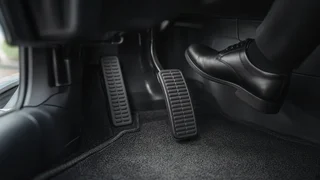
On a 2010 Chevrolet Cobalt, the oil life monitor is normally reset with the accelerator pedal rather than a dashboard button. With the ignition on and the engine off, you press the accelerator slowly to the floor three times within about five seconds. The oil change light or message should flash and then turn off, which means the system has been reset to 100 percent. This is the reset method GM used across many vehicles of this era, including the Cobalt. It applies to both 2010 engines, the 2.2-liter four-cylinder and the 2.0-liter turbocharged SS.
Reset the monitor only after the oil has actually been changed. The system does not measure the oil directly. It estimates remaining oil life from operating conditions such as engine revolutions and engine temperature. Resetting it without changing the oil removes the reminder while the oil keeps wearing out.
Step-by-Step: Accelerator Pedal Method
1) Park the car and make sure the engine is off. 2) Turn the ignition to ON/RUN without starting the engine. The dashboard lights should come on. 3) Press the accelerator pedal slowly and fully to the floor three times within about five seconds. 4) Watch the oil change indicator. It should flash and then go out, which confirms the reset. 5) Turn the ignition to LOCK/OFF. 6) Start the engine. If the oil change indicator comes back on, the reset did not take. Turn the engine off and repeat the procedure.
Tips if the Reset Does Not Work
Make sure the engine is not running. The procedure is done with the ignition on and the engine off. Press the pedal smoothly all the way down. Short or partial presses may not register. Keep all three presses within the time window. Going too slowly is a common reason the reset fails. If repeated attempts fail, the cause could be a fault in the cluster, the pedal sensor or the related electronics. A technician with a scan tool can usually reset the monitor and check for stored trouble codes.
Cars With a Driver Information Center
Some 2010 Cobalt trims were equipped with a Driver Information Center (DIC), a small display that shows trip and vehicle information. On cars with a DIC, the remaining oil life may also be viewable on that display, and the owner's manual may describe a button-based reset. The exact button sequence depends on trim and equipment and could not be confirmed here. If your car has a DIC, follow the owner's manual for that method. The pedal method above is the standard procedure for this model.
What to Confirm in Your Owner's Manual
This guide reflects GM's published reset procedure for vehicles of this generation, but it was not checked against a specific 2010 Cobalt owner's manual. Before relying on these details, confirm three things in your manual's engine oil life system section: the timing window for the pedal presses, any DIC-based reset method and the recommended oil specification for your engine.