Using Dashcam Footage as Evidence After a Hit-and-Run
The short answer
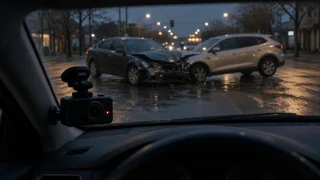
Dashcam footage can be some of the most useful evidence after a hit-and-run. It may show the other vehicle's make, color, damage or license plate, the sequence of events, and the time and place of the collision. Police can use it to try to identify the driver who left, and insurers can use it to help decide your claim. Footage does not guarantee an outcome, though. Its value depends on what the camera actually captured, whether the file is preserved intact, and the rules of your state, your insurer and any court involved.
What dashcam footage can and cannot establish
In a hit-and-run, the central problem is usually identifying the other driver. Video can help by recording identifying details of the fleeing vehicle and by showing how the collision happened, which matters for fault. It can also corroborate your account if the other party is later found and disputes what happened.
The limits are practical. A license plate may be unreadable because of distance, low light, glare, rain, motion blur, a shallow camera angle or the camera's resolution. A forward-facing camera may miss a vehicle that strikes the side or rear. And a vehicle description without a plate may not be enough for police to identify the driver. Even partial footage can still matter, because it can corroborate that the collision happened and when, which may matter for an insurance claim.
Preserve the footage first
Most dashcams use loop recording, meaning they record continuously and overwrite the oldest files when the memory card fills. Many models also have an impact sensor (often called a G-sensor) or an emergency button that locks the current clip so it is not overwritten. Because behavior varies by camera, do not assume a clip was saved automatically. Check your camera's manual or settings.
Lock the clip manually if your camera allows it, or stop recording once it is safe to do so. Remove the memory card or copy the relevant files as soon as practical, before further driving can overwrite them. Make more than one copy and store them in separate places, such as a computer and a cloud backup. Keep the original files unedited. Do not trim, enhance, compress or re-encode the originals; if you need a shorter clip, make it from a copy. Keep the original memory card if you can, in case its contents or file data are needed later. Note whether the camera's date and time settings were correct, and record any known offset.
Report it and share the footage
Leaving the scene of a collision is a crime across the US, so a hit-and-run should be reported to the police. Tell the officer or the agency handling the report that you have video, and ask how they want to receive it. Write down the report or case number, because your insurer will likely ask for it.
Notify your insurer promptly and tell them you have footage. Depending on your policy, a hit-and-run may be covered under uninsured motorist coverage, collision coverage or both. Some policies and states set specific conditions for hit-and-run claims, such as prompt police reporting or proof that the collision occurred. Dashcam video may help meet those conditions, but check your own policy wording or ask your insurer directly.
Admissibility and legal considerations
Video can be used as evidence in US courts if it is authenticated, meaning someone can establish that it accurately shows what it claims to show. This is why unedited originals, correct timestamps and a clear record of who handled the files are important. Whether a specific recording is admitted is decided by the court under the applicable rules of evidence.
Audio recording is a separate issue. Some states require consent from everyone being recorded in a private conversation, so a dashcam that records audio inside the vehicle may raise legal questions. Video of public roads generally raises fewer concerns. Rules on where a dashcam can be mounted on the windshield also vary by state. If the footage may be used in a lawsuit or criminal case, a local attorney can advise on your state's specific rules.
What this guide does not cover
No state-specific statutes, reporting deadlines, insurance policy terms or dashcam model specifications were available for this article, so it does not give exact time limits, coverage amounts or recommended camera specs. Those details vary by state, insurer and device. Confirm them with your local police department, your insurer, your camera's documentation or a qualified attorney.