How to Reset the Porsche Service Indicator on a Cayenne

A Porsche Cayenne service reset clears the reminder that appears in the instrument cluster after a scheduled service has been carried out. There is no single procedure for every Cayenne. The method depends mainly on the model generation and model year. Market specification and the equipment fitted to the car can also matter. On many Cayennes the owner-facing menus show how much time or distance remains before the next service, but clearing the reminder is commonly done with a diagnostic tool. A Porsche dealer uses the factory system for this, and some aftermarket scanners and independent shops can also do it. The same general principle applies to a Porsche service reset on other models, though the exact steps differ by vehicle.
What the Service Indicator Actually Tracks
The service indicator, sometimes called the service interval display, is a countdown rather than a sensor reading. The vehicle tracks elapsed time and distance since the last reset and compares them with the maintenance schedule stored for that vehicle. When either limit approaches, the cluster shows a reminder. The reminder does not measure oil condition, filter condition or component wear directly.
Many Porsche vehicles track more than one type of service. A common arrangement is an oil change interval and a separate inspection interval for broader checks. Depending on the car and the tool used, these may need to be reset individually. Resetting one does not necessarily clear the other.
Why the Method Depends on Your Cayenne
The Cayenne has gone through several generations, and each has different instrument cluster software and onboard menus. Even within a generation, model-year updates, trim level and market specification can change what appears in the menus. Powertrain configuration can also affect which service items the car tracks. For example, a hybrid or diesel model may have different maintenance items from a gasoline model. Because of this, it is best to confirm the procedure for your exact vehicle rather than follow a generic set of button presses.
Generation (internal code) | Approximate US model years | What to check before resetting; First generation (955) | 2003–2006 | Whether your scan tool supports this older cluster; owner-menu reset options are limited or absent on many cars; First-generation update (957) | 2008–2010 | Same as above; confirm the tool lists the specific model and engine; Second generation (958 / 92A) | 2011–2018 | Owner's manual section on the service interval display; tool support for oil and inspection intervals separately; Third generation (9Y0) | 2019 onward | Current menus in the cluster and infotainment system; whether the reset is restricted to diagnostic equipment on your car
Model-year boundaries can vary slightly by market and body style. The Cayenne Coupe, for example, joined the third generation. Treat the table as a starting point for identifying your car, not as a guarantee of how its reset works. Your owner's manual or the model information shown by a diagnostic tool will confirm the generation.
Method 1: Resetting With a Diagnostic Tool
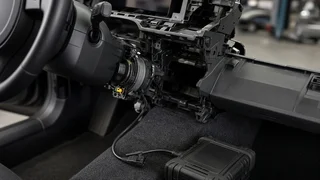
This is the most widely applicable approach. Porsche dealers use the factory diagnostic system, known as PIWIS. Some aftermarket scan tools advertise Porsche-specific service functions. Coverage varies by tool, software version and vehicle, so check that the tool explicitly lists your Cayenne's generation and model year before buying or using it. The exact menus vary by tool, but the general sequence is as follows:
Park the car on level ground and make sure the battery is in good condition, because a weak battery can interrupt communication with control units. Connect the tool to the OBD-II diagnostic port, which is located in the driver's footwell area beneath the dashboard. Switch the ignition on without starting the engine, unless the tool instructs otherwise. Select Porsche, then the correct model, generation and model year in the tool. Open the instrument cluster or service function and choose the service reset or maintenance reset option. Select the specific interval to reset, such as oil service or inspection, and confirm. Switch the ignition off and on again, then check the cluster to confirm the new service interval is displayed.
Method 2: Resetting Through the Instrument Cluster
Some vehicles allow interval information to be viewed or adjusted through the onboard menus, operated with the steering-wheel controls or stalk buttons. Whether a full reset is available this way varies by generation, model year and market. On many Cayennes the menu displays remaining time and distance without offering a reset option. If your car does provide one, the owner's manual section on the service interval display or the onboard computer will describe it. Following steps written for a different generation is unlikely to work and can lead to changing unrelated settings.
What a Service Reset Does Not Do
It does not clear warning lights caused by actual faults, such as the check engine light, which point to a stored fault code. It does not reset brake pad wear warnings, which typically come from wear sensors that need replacement along with the pads. It does not happen automatically when the battery is disconnected, as the interval data is retained. It does not record that any work was done. It only restarts the countdown.
Before You Reset
Only reset the indicator after the corresponding maintenance has been completed. Clearing the reminder without doing the work removes a useful prompt and can leave the car overdue for oil or inspection items. Keep receipts and records showing the date, mileage, parts and fluids used. These records support the vehicle's maintenance history for warranty purposes and are valuable when you sell the car. If you do the work yourself, use oil and parts that meet the specification listed for your engine.
When to Leave It to a Shop
If you do not already own a compatible diagnostic tool, it is often simpler to have the reset done when the car is serviced. A Porsche dealer or a well-equipped independent specialist will normally reset the correct intervals as part of the job. This is also the safer route if the cluster shows a reminder you cannot identify, or if the reset does not stick after you try it. Either problem can point to a software issue or a different maintenance item from the one you serviced.
The Short Answer
Identify your Cayenne's generation and model year first. Then reset the service indicator with a diagnostic tool that supports that vehicle, or use the onboard menus if your car offers that option. Reset each interval that was actually serviced, confirm the new countdown appears, and keep a record of the work.