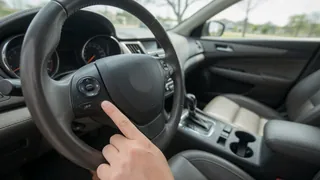
How to use voice-activated car controls
Voice-activated car controls let the driver manage selected vehicle functions by speaking instead of pressing a switch, turning a knob, or touching a screen. The system listens for a wake word or steering-wheel button press, converts speech into a command, and asks a control module to perform an action. Success depends on the vehicle configuration, the operating state, and how clearly the request matches the system’s expected function label. Using the feature well means understanding which functions respond, when the system is listening, and how to recover cleanly from a misunderstood request.
Direct answer
The essential method is to activate the system deliberately, speak a recognized command using natural but concise language, and wait for the system response before continuing. Most voice-activated car controls begin with a steering-wheel voice button or a spoken wake phrase, after which an audible prompt or on-screen indicator confirms the microphone is listening. The driver then states the desired function label, such as navigation, phone, media, or climate, followed by a narrow request. Voice recognition works best when the command matches the phrases the infotainment system was programmed to understand.
The result is not a universal conversation with the car. A control module interprets the digitized speech against a limited set of accepted switch inputs mapped to the current operating state. Some functions are unavailable while moving, during a call, or when a paired device is not connected. If the system answers with a correction or asks a follow-up question, that is the normal negotiation between the driver and the vehicle configuration, not necessarily a failure. Confirming the completed action and cancelling an incorrect one are part of reliable use.
How to proceed
Start with the vehicle stationary and the infotainment system powered on. Read the screen for the available voice function label before pressing the steering-wheel voice button or speaking the wake word, and keep cabin noise low. Wait for the confirmation tone or visual cue, then say one complete command in a normal tone without pausing mid-phrase, such as the phone command followed by a contact name or the navigation command followed by a destination. If the response is wrong, use the standard cancel command or a displayed option to stop the action rather than speaking over the prompt.
After the first successful command, test a different switch input while parked to understand how the system handles corrections and related terms. Do not attempt detailed setup or pair a phone while driving. When a command is consistently misheard, shorten the phrase, use the exact label shown on screen, reduce fan or road noise, and make sure the microphone opening is clean and not covered. If a particular function remains unavailable, check the owner’s settings for that control module or confirm whether the feature belongs to a connected phone’s voice assistant instead of the built-in system.