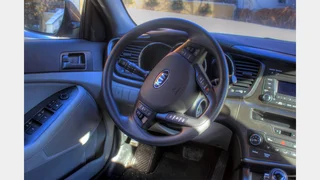
2015 Kia Optima Oil Life Reset

The Short Answer
On a 2015 Kia Optima, the maintenance reminder is reset through the instrument cluster display, not with a scan tool or a hidden switch. With the ignition on, you scroll to the service interval screen using the cluster or steering-wheel controls, then reset it with the reset or OK button. The exact button names and menu path depend on which instrument cluster your car has, so treat the steps below as a general guide and confirm the wording in your owner's manual.
One qualification matters: what many owners call an oil life reset on this car is usually a service interval reminder. It counts down a distance or time interval set in the cluster. It is not generally described as an oil life monitor that estimates oil wear from driving conditions. Resetting it only restarts the countdown. It does not confirm that the oil was changed or that the interval is right for how you drive.
Which Cars This Applies To
This guide covers the 2015 model year of the Kia Optima sedan from the generation sold from 2011 to 2015. Cars sold in other markets, the hybrid variant, and cars with different cluster options may have different menu labels or button locations. The supplied material does not give a verified procedure for each trim or powertrain, so check the owner's manual for your specific car.
General Reset Procedure
Cars with a basic cluster display, where a trip button cycles the screens, typically use this approach:
1) Park the car and turn the ignition to the on position. Some steps may also work with the engine running. 2) Press the trip or mode button repeatedly until the service interval reading appears. 3) Press and hold the reset button until the reading returns to the full interval or confirms the reset. 4) Cycle the ignition off and on and check that the reminder no longer shows as due.
Cars with a larger multi-function cluster display, controlled from steering-wheel buttons, typically use a settings menu instead:
1) With the car stopped and the ignition on, open the user settings menu with the steering-wheel mode or menu button. 2) Scroll to the service interval item. 3) Select it, then choose the option to reset the reminder. On some cars you can also set or enable the interval here. 4) Confirm with the OK button, exit the menu, and check that the new interval is shown.
Some settings menus only open while the car is stationary. If the service interval item does not appear, make sure the car is in park and fully stopped.
Setting the Right Interval
Because the reminder counts down a stored interval, the value it resets to should match the maintenance schedule for your engine and driving conditions. Kia's schedule separates normal driving from severe driving, such as frequent short trips, towing, dusty roads, or extended idling. The supplied material does not include the specific mileage or time intervals for the 2015 Optima's engines. Use the maintenance section of your owner's manual, or ask a Kia dealer, for the correct figures.
If the Reminder Will Not Reset
If the procedure above does not clear the reminder, the menu path or button labels on your car likely differ from the general steps. The owner's manual's instrument cluster section is the authoritative reference. A Kia dealer or the shop that did the oil change can also reset it. They normally do this as part of the service, so check the display before leaving.
Information Gaps
No manufacturer documentation was supplied for this article. Exact button names, menu wording, whether the engine must be off, and the default service interval values for each 2015 Optima trim and powertrain could not be verified here. Confirm these details in the owner's manual for your car before relying on them.