Why Are Frequently Used Car Controls Near the Steering Wheel?
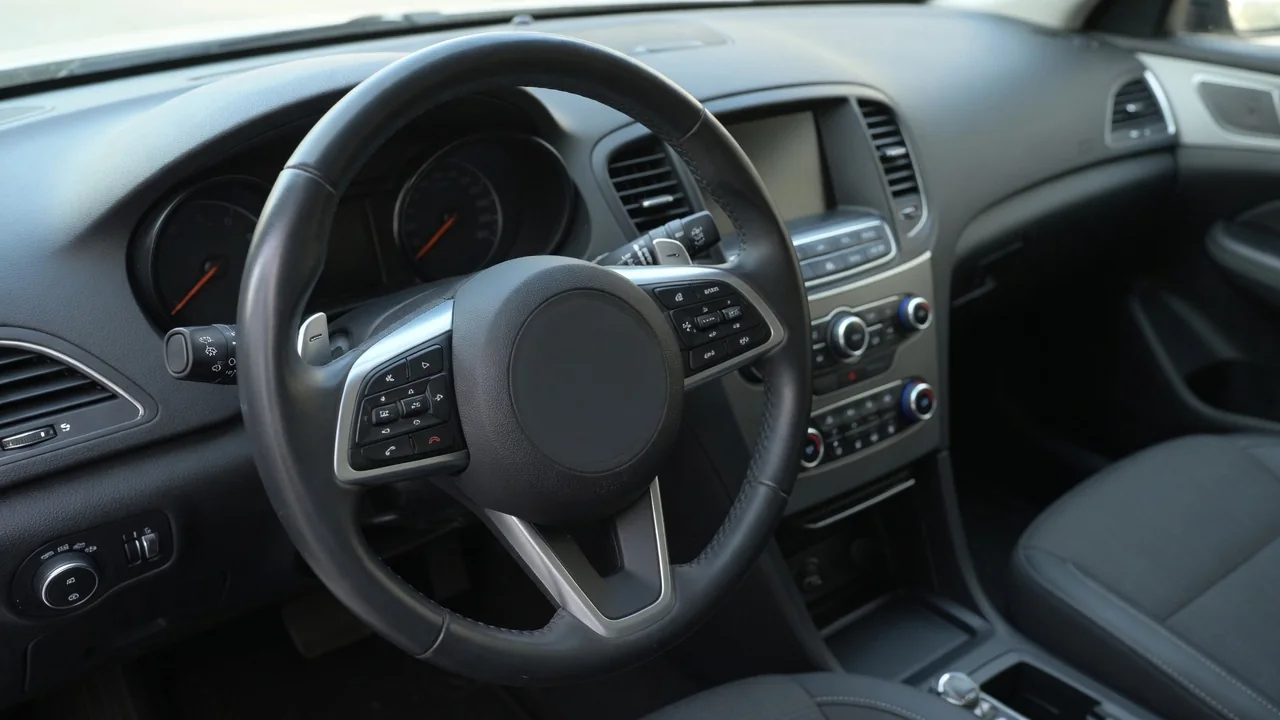
Turn signals, wipers, horn, cruise control and audio volume are not placed at random. In most modern cars, the controls a driver uses most often are on or around the steering wheel. The reason is ergonomic. Every time a driver looks away from the road or takes a hand off the wheel, control and awareness drop for a moment. This article explains how attention, hand travel and layout logic shape car control reach ergonomics, and where that logic has limits.
Attention: Keeping Eyes and Mind on the Road
Driving is mainly a visual task. The road ahead, the mirrors and the instrument cluster all compete for the driver's eyes. Any control that needs its own glance pulls attention away from traffic. Putting frequently used controls near the steering wheel shortens how far the eyes have to move, and ideally the driver does not need to look at all. A stalk or wheel-mounted button sits within the driver's normal forward-facing posture, so it can be used while the road stays in central or near-peripheral view. A control low on the center console or buried in a touchscreen menu often needs a deliberate downward glance. The driver then needs a moment to reorient when the eyes return to the road.
Attention is mental as well as visual. When a control is always in the same place relative to the hands, drivers build muscle memory and using it becomes close to automatic. Signaling a lane change or switching the wipers to a faster speed then takes little conscious thought, which leaves more capacity for judging gaps, speeds and hazards. Controls that have to be searched for, or that move depending on what a screen is showing, keep pulling the task back into conscious decision-making. Placing a control close to the wheel helps keep its position consistent, and consistency is what lets a control fade into the background of the driving task.
Hand Travel: Shorter Reach, Steadier Control
The hands spend most of their time on the steering wheel, so the wheel is the natural reference point for reach. Each extra distance a hand travels away from the rim adds time to the action. It also briefly reduces steering control, especially if the driver has to lean or twist to reach the control. Buttons on the wheel spokes can often be pressed with a thumb while both hands stay on the rim. Stalks on the steering column need only a short finger or wrist movement. Both approaches keep the driver in a stable, supported posture instead of reaching across the cabin.
Short hand travel matters most when steering is already demanding, such as turning at intersections, merging, changing lanes or reacting to sudden rain. These are exactly the moments when drivers use turn signals, the horn, headlight flash and wipers. Designers therefore place these functions where they can be reached without letting go of the wheel for long, or at all. Functions used mainly while cruising, such as cruise control adjustments or audio volume, are also often on the wheel. Drivers adjust them many times over a long drive, so small reductions in reach add up.
Reach also depends on body size and seating position, and a control that is easy for one driver may be a stretch for another. Putting key controls on the wheel or column helps because those parts move with the driver's setup. When the steering column is adjusted for tilt or reach, the controls attached to it move with it. Their position relative to the hands stays roughly the same.
Layout: How Controls Are Arranged by Priority
Cabin layout generally follows a hierarchy based on how often a control is used and how important it is to safe driving. Primary controls such as the steering wheel, pedals and gear selector form the core. Secondary controls that are used often or in time-sensitive situations, including signals, lights, wipers and horn, sit close to that core. Comfort and convenience functions that are adjusted less often, such as climate settings, seat heating or navigation input, tend to be placed further out on the center stack and console. In general, the further a function sits from the wheel, the less often or less urgently a driver is expected to need it while moving.
Around the wheel itself, designers also group controls by function and give them distinct shapes or motions. Lighting functions are commonly gathered on one stalk and wiper functions on another. The direction of movement often matches the result, as when a signal stalk moves in the direction of the intended turn. Buttons on the wheel are usually grouped by system, such as audio in one cluster and cruise or driver-assistance functions in another. The exact arrangement varies by manufacturer. Raised edges, rocker switches and scroll wheels let drivers tell controls apart by touch, which supports eyes-free use.
Layout also has to avoid crowding. The steering wheel has limited surface area, contains an airbag in its center and rotates. Too many buttons on the spokes become hard to tell apart, which undermines the attention benefit the location was supposed to provide. For that reason, the wheel is usually reserved for a limited set of high-frequency functions. Everything else goes to the column, the dashboard or the infotainment system.
Practical Implications and Limits
For owners, the main point is that a wheel-centered layout only pays off once the driver knows it. Before driving an unfamiliar car, it is worth spending a few minutes with the owner's manual and the controls while parked. Check how the wipers, lights, cruise control and hazard functions work and which buttons do what. Adjusting the seat and steering column so that stalks and spoke buttons fall naturally under the fingers is part of the same setup. A poorly adjusted driving position can turn a well-placed control into an awkward reach.
Placement can only do so much. Wheel-mounted buttons rotate with the wheel, so they are easiest to use when the wheel is near center and less convenient in tight turns. Some functions have moved from physical controls into touchscreens or multi-level menus, and the effect on ease of use depends on the vehicle and its software design. Some touch-sensitive surfaces on steering wheels give less tactile feedback than traditional buttons and may be activated by accident while gripping the rim. Conventions can also differ between manufacturers and between left- and right-hand-drive markets, so habits learned in one car may not carry over exactly to another.
Finally, convenient placement makes a control easier to use, but using it is never free. Even an eyes-free button adds a small task to the driving workload. Adjusting secondary functions is still best saved for straight, predictable stretches of road or for when the vehicle is stopped. Good layout supports attentive driving; it cannot replace it.