Mazda Blind Spot Monitoring Reset: CX-5, Mazda3 and Calibration Guide
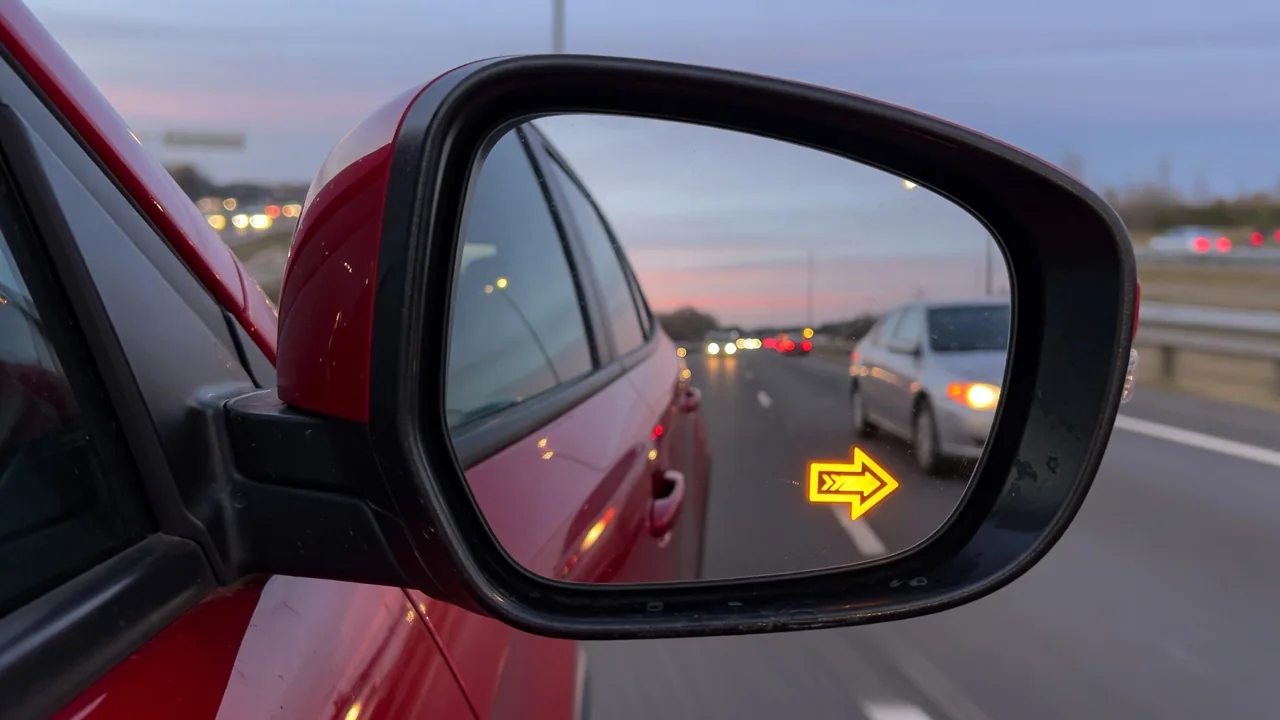
A blind spot monitoring warning on a Mazda can mean anything from a muddy bumper to a radar sensor that needs professional attention. Before you search for a Mazda blind spot monitoring reset, it helps to know what the system is reporting and which fixes are safe to do at home. This guide covers the CX-5, the Mazda3, and the point where radar sensor calibration becomes necessary.
What a Mazda Blind Spot Monitoring Warning Is Telling You
Mazda Blind Spot Monitoring, usually shortened to BSM, uses radar sensors hidden behind the rear bumper corners. They watch the lanes beside and slightly behind the car. When another vehicle enters that zone, an amber side mirror blind spot indicator lights up. If you signal toward an occupied lane, the indicator typically flashes and a chime sounds. On many models the same rear radar sensor hardware also supports rear cross traffic alert, so one fault can affect more than one driver assist warning.
A BSM warning light can mean two different things. The driver may simply have switched the feature off, and in that case a blind spot monitoring system off indicator reflects a choice, not a fault. Or the system may have disabled itself after detecting a blockage or an internal problem. So a reset can mean turning the feature back on, waiting for it to clear once a temporary condition passes, or calibrating it with diagnostic equipment. Wording and symbols vary by model and year, so check their meaning in your owner's manual.
Safe Checks to Make Before Trying a Reset
The most common trigger is simple: something is covering the radar. Snow, ice, road salt, mud, or a film of grime on the rear bumper corners can weaken the signal enough that the system shuts down temporarily and reports a rear bumper sensor blocked condition. A reasonable first step is to wash the bumper surface gently with water and a soft cloth. Don't use a pressure washer at close range or scrape the paint, because the sensors sit just behind the bumper cover and that area shouldn't be damaged.
Other conditions can limit detection without any fault. Heavy rain, road spray, a trailer, a bike rack, or a cargo carrier mounted near the rear bumper can confuse or block the radar. Note when the warning appears, whether it clears after a drive cycle, and whether it comes back, because that pattern gives a technician useful evidence. Also think about whether the battery was recently disconnected, jump started, or running low. Low voltage can coincide with driver-assist warnings, but it isn't always the cause.
Resetting or Re-Enabling Blind Spot Monitoring on the Mazda CX-5
For a Mazda CX-5 blind spot monitoring reset, start with the simplest explanation: the feature may have been turned off. On many CX-5 model years, BSM can be switched on or off through the vehicle settings menu in Mazda Connect settings, often under a safety or driver assistance heading. Menu names and paths differ between years and infotainment versions. Confirm the exact route in your owner's manual or the infotainment help screens rather than following steps written for a different CX-5.
Once the system is back on, watch the side mirror indicators at startup, because many systems light them briefly as a self-check. In normal traffic, notice whether the indicators respond when a vehicle passes through the next lane, but never change lanes just to test the system. If the BSM warning stays on after you've cleaned the bumper corners and confirmed the feature is enabled, a settings toggle won't fix it. The CX-5 needs diagnosis to find out why the system keeps disabling itself.
Resetting or Re-Enabling Blind Spot Monitoring on the Mazda3
A Mazda3 blind spot monitoring reset follows the same logic, but the details depend on the car. BSM controls are usually in the vehicle settings or safety settings menu, but the layout differs between Mazda3 generations and infotainment versions. Sedan and hatchback body styles also use different rear bumper designs, so don't assume sensor locations, coverage, or behavior match a CX-5 or another Mazda. Check your manual for the menu path and for where the sensors are mounted before you clean or inspect them.
With the system back on, the warning should clear and the mirror indicators should respond to traffic beside the car during normal driving. If the indicator or message comes back at the next startup, the system has detected a problem again. A warning that keeps returning points toward a sensor, wiring, mounting, or module issue that needs testing. Repeated resets won't repair it, and switching the feature off to hide the warning just leaves you driving without the aid.
When a Reset Is Not Enough: Professional Radar Sensor Calibration
Radar aim matters. Rear bumper repairs, collision damage, a bent sensor bracket, paint or body filler applied over the sensor area, or removing or replacing a sensor can all change where the radar points. Sensor misalignment after collision repair can cause missed alerts or false alerts even when no warning appears, which is why calibration may be required. A replacement bumper cover may also affect performance if its material or thickness differs from the original.
Calibration and fault-code reading are done by a dealer or a shop with suitable Mazda-capable equipment, and the procedure and requirements depend on the specific vehicle. A dealer diagnostic scan can read stored codes, but those codes have to be interpreted for your exact model and year. A code is evidence pointing toward an area, not proof that a part has failed. After any rear-end body work, ask the shop to confirm in writing whether radar sensor calibration was done and verified.
Limits of DIY Troubleshooting and Signs You Need a Technician
Some steps belong in the shop. Don't remove the rear bumper cover, unplug radar sensors, or alter wiring yourself. Disturbing a sensor or its mount can cause misalignment, damage connectors, and make calibration necessary. See a technician when the warning stays on after cleaning, when alerts go off with no vehicle nearby, when no alert appears even though a car is clearly alongside, or when the BSM warning shows up together with other driver-assist faults such as rear cross traffic alert messages.
Symptoms alone can't tell you whether the cause is the sensor, its mounting, the wiring, or a control module. A technician needs to test each part of the circuit and check alignment before replacing anything, so you don't pay for parts that were never faulty. Until the repair is done, remember that a disabled system takes away a driver aid, not your responsibility. Set your mirrors correctly, do a shoulder check before every lane change, and leave extra room when merging or backing out.