Lane Keeping Assist Unavailable: Causes, Suspend Beep and Fixes
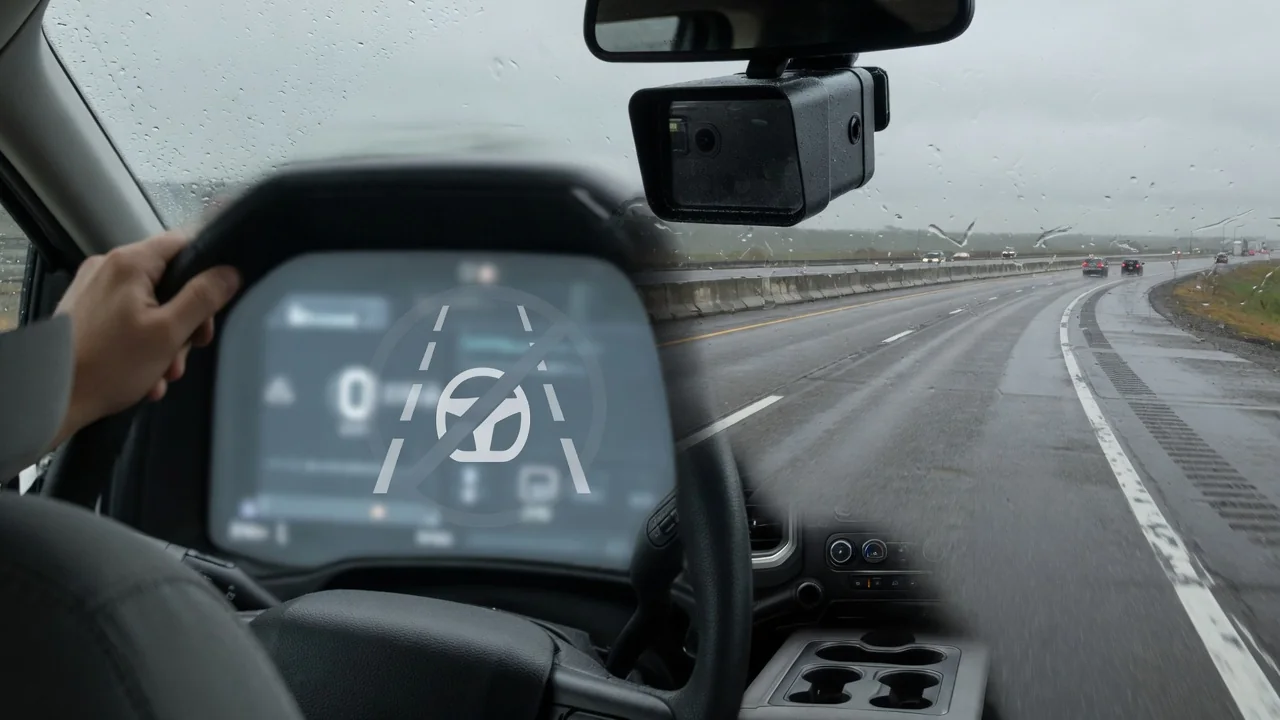
Seeing a lane keeping assist unavailable message, or hearing a lane keeping assist suspend beep, can make it seem like something on your truck or SUV has broken. Most of the time the system has simply paused because it can't track the road well enough to help steer. Here's what the message and the beep mean, why they show up, and when it's worth having a technician check the driver assistance systems.
What the Lane Keeping Assist Unavailable Message Means
In most vehicles, a lane keeping assist system unavailable notice means the feature has stepped back because conditions no longer meet its operating requirements. The forward-facing camera may not see the lane markings clearly. The vehicle may be going slower than the speed where steering assist works, or the driver may have done something the system reads as a planned lane change. That kind of pause is normal and usually clears once the road or the weather improves. The message alone doesn't mean a part has failed.
A temporary notice is different from a lasting service warning. A message that comes and goes with conditions usually reflects the system's limits. A message that stays on and tells you to service the driver assist system, or an amber warning light, means the vehicle has flagged something for inspection. Wording varies by manufacturer. Some brands say Active Lane Keeping Assist currently unavailable, while others use shorter text, so check what your owner's manual says. Either way, you're responsible for steering and staying in your lane at all times.
Why Lane Keeping Assist Becomes Unavailable
The most common answer to why lane keeping assist is unavailable is the road itself. The camera looks for painted lines, and faded, missing or doubled markings give it little to follow. Construction zones with temporary paint, tight curves, narrow lanes, merge areas and intersections can all confuse it. Weather plays a big role too. Rain, snow, fog, glare off wet pavement, low sun and darkness on unlit roads all make lines harder for the camera to pick out.
The windshield area in front of the camera matters just as much. Dirt, bug splatter, ice, fog on the inside of the glass or a sticker in that spot can block its view. A replacement windshield or a damaged camera mount can also throw off where the camera points. Many systems have operating conditions too: a minimum speed, a pause while the turn signal is on, hands-off detection, or the feature simply being switched off. Check your own vehicle's limits in the manual. Note when and where the message appears, and clean the glass only while parked.
What the Lane Keeping Assist Suspend Beep Means
So what is the lane keeping assist suspend beep? In general terms, it's a sound that plays when the system pauses or goes temporarily inactive. It tells you steering assist is no longer helping you stay in the lane. There's no single definition, because brands name and program these chimes differently. Some vehicles pair the beep with a dash icon changing color, while others sound it only when assistance cuts out mid-drive. Your owner's manual is the place to confirm what the suspend beep means on your vehicle.
It also helps to tell the suspend alert apart from other warnings. A lane departure warning chime, or a vibration in the steering wheel or seat, usually means you're drifting toward a line. A suspend alert means the system itself has stopped working for now. When the beep sounds, notice what's happening without taking your eyes off the road for long. Worn paint, a curve, heavy rain, dropping below a speed threshold or using the turn signal often explains the pause.
Should the Suspend Beep Be On or Off?
Whether to leave the lane keeping assist suspend beep on or off comes down to preference. Leaving it on gives you a clear signal that assistance has stopped, which matters because the steering may feel only slightly different when the system drops out. Turning it off cuts down on repeated alerts on roads where the lines come and go, which some drivers find distracting. Where the setting exists, it's usually in the vehicle settings or driver assistance menu. Follow your owner's manual rather than a generic menu path.
Silencing the alert doesn't change how the system works. It still pauses in the same conditions, for the same reasons, and the camera still needs a clear view and visible lane markings. If you turn the beep off, get in the habit of glancing at the status icon on the dash. It usually shows whether lane keeping is active, on standby or unavailable. That quick look keeps you from assuming the system is helping when it isn't.
Lane Keeping Assist Unavailable on GMC Sierra, Chevy Equinox and Other GM Models
Owners often report the lane keeping assist system unavailable message on GMC Sierra pickups, the Chevy Equinox and other GM models. The same message is common on many brands that use camera-based systems, so it doesn't point to a known defect. Features, message wording and camera location can differ by model year and trim. Some versions offer lane departure warning without active steering. Check the owner's manual for your exact vehicle before deciding what the message means on your GMC or Chevrolet.
Start with simple checks. Confirm the feature is switched on, usually with a button or a menu setting. Look at the windshield in front of the camera for dirt, frost or condensation. Think about the road and the weather when the message appeared, and see whether it clears on its own once conditions improve. On a Sierra used for towing or work, road spray and grime on the glass are worth ruling out. If the message stays on in good conditions, contact a GM dealer or qualified technician instead of assuming a part has failed.
When an Unavailable Message Needs Professional Diagnosis
Some signs point beyond a temporary condition. The message stays on in clear weather on well-marked highways. Other features that rely on the same camera switch off too. Or a service message or warning light appears. After a windshield replacement, camera work or collision repair, the camera may also need ADAS calibration. A qualified shop does this with the proper targets and equipment, since even a small aiming error can affect how the camera reads lane markings.
Without a scan tool, a driver can only watch for patterns. Any stored fault codes need to be read alongside the manufacturer's own information, and a code is a clue to investigate, not proof that the camera has failed. Don't remove, adjust or realign the camera or its mount yourself, because calibration depends on precise positioning. Let a dealer or professional test the system. Until the problem is fixed, drive as if lane keeping assist isn't there at all.