Lane Keeping Assist Not Working: Causes, Warning Messages and Next Steps
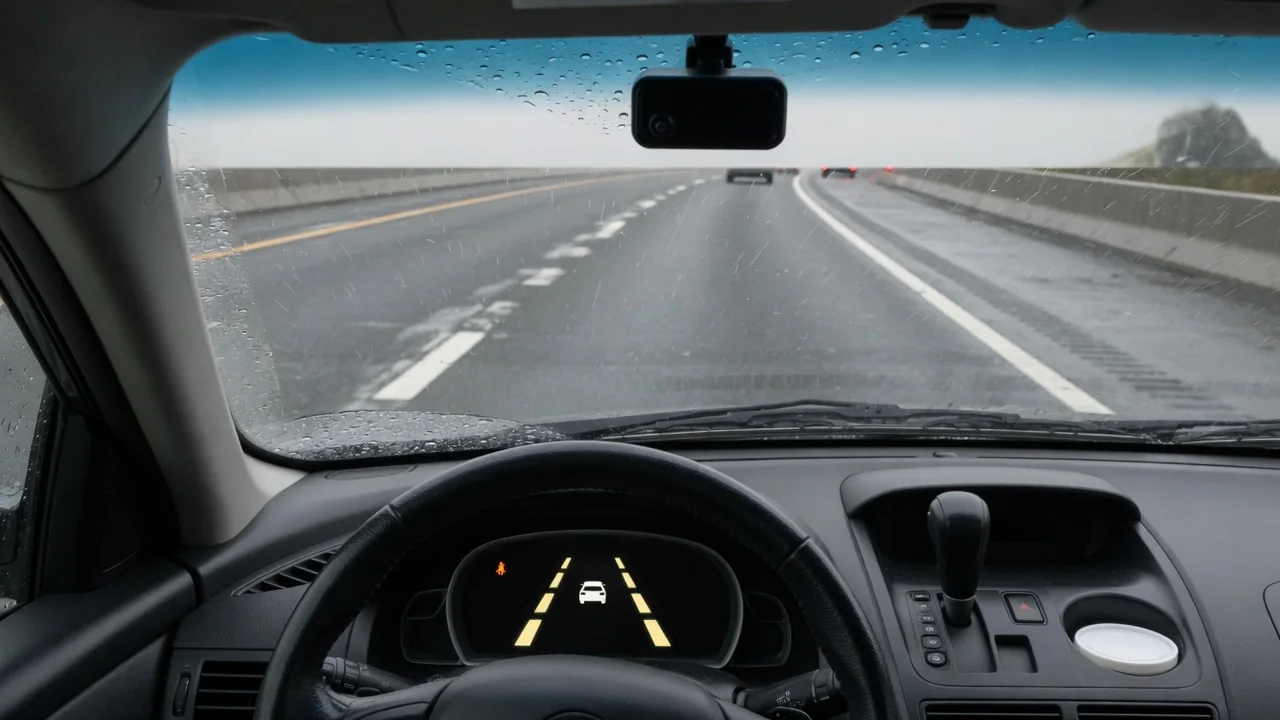
A lane keeping assist problem can mean anything from a system that is simply switched off to a stored fault that needs a dealer. Why is my lane keeping assist not working? Often the answer is weather, faded lines, or a dirty windshield, but a warning that stays on deserves attention. The way to read those signs is similar for Honda, Acura, Lexus, and Mercedes vehicles, even though the messages differ.
What a Lane Keeping Assist Problem Looks Like From the Driver's Seat
Lane keeping assist can be in three broadly different states, and telling them apart saves time. Switched off means the driver or a settings menu has disabled it, so nothing will happen. Temporarily unavailable means the system works but cannot operate right now, often shown with a gray or white indicator. A malfunction warning, frequently shown in amber with a message in the instrument cluster, means the car has detected something wrong and may have stored a fault.
Typical symptoms include no steering correction when the car drifts toward a line, an indicator that never becomes active, or the system switching itself off on the move. This is a driver aid with operating limits, so a lack of intervention is not automatically a lane keeping assist system problem. When a message appears, note its exact wording, the indicator color, your speed, and the weather and road conditions. Those details make later diagnosis much faster.
Why Lane Keeping Assist Stops Working Temporarily
The forward-facing camera, usually mounted near the top of the windshield, has to see lane markings before it can steer. Faded paint, missing lines, construction zones, tar seams, and merging lanes can leave it without a usable reference. Rain, snow, fog, glare from a low sun, and dirt or ice on the glass in front of the camera can also block its view, so the system may stand by until the markings are detected again.
Many systems work only within a set speed range and pause when the turn signal is on or when hands-on-wheel detection senses no steering input. Sharp curves and narrow lanes can also cause disengagement, and the exact conditions vary by vehicle, so the owner's manual is the reference. Safe checks are simple: clean the windshield area in front of the camera, confirm the feature is enabled in settings, and restart the car once it is safely parked.
Honda LKAS Problem and the 'See Your Dealer' Message
On many Honda models, a message along the lines of LKAS problem, see your dealer suggests the car has logged a fault rather than reacting to a temporary condition such as rain. The exact wording varies by model and year, and it may appear alongside other Honda Sensing alerts. Owners chasing a Honda CR-V lane keeping assist problem, or the same concern on a Civic or Pilot, should check their own manual for that model's indicator meanings rather than assuming one cause fits every year.
A message that clears after a restart or better weather is different from one that stays on. If the warning persists, the next step is a scan with suitable diagnostic equipment, keeping in mind that a fault code is evidence to interpret, not proof a part has failed. Recent glass replacement, collision repair, or suspension and wheel alignment work can affect a camera-based system, and a professional inspection or ADAS calibration may then be needed to restore normal steering assist.
Acura Lane Keeping Assist Not Working
When Acura lane keeping assist is not working, start by confirming whether the system is off, on standby, or reporting a fault on the display, because each state points in a different direction. Then repeat the basic checks in context: make sure the camera area behind the windshield is clean and free of stickers or fogging, verify the feature is enabled in the settings menu, stay within its operating speed range, and drive where lane markings are clearly visible.
If an Acura lane keeping assist problem shows up only on one stretch of worn road, it is probably an operating limit. A warning that stays on through several drives, across different roads and weather, is another matter and needs diagnosis rather than guesswork. Because message meanings and limits differ between Acura models and years, the owner's manual should be consulted for what a specific indicator means before anyone replaces parts or assumes the camera has failed.
Lexus RX 350 Lane Keeping Assist Malfunction Message
A lane keeping assist malfunction on a Lexus RX 350 is not the same as a notice that the system is temporarily unavailable. The first usually indicates a detected fault, while the second typically reflects conditions like weather or missing lines. Wording differs between model years, so owners should confirm what their specific message means in the owner's manual before deciding how urgent the issue is or whether the vehicle needs a dealer visit.
Write down when the Lexus RX 350 lane keeping assist malfunction appears, whether other features such as lane departure warning are also affected, and whether it clears after a restart. Several warnings at once may point to a shared sensor or camera issue, but the cause cannot be confirmed without professional testing. Any windshield, bumper, or alignment work done shortly before the message appeared is useful information to share with a technician, since it narrows down where to look first.
Mercedes Active Lane Keeping Assist Not Working
When Mercedes Active Lane Keeping Assist is not working, first confirm it is turned on in the vehicle settings and, if the model offers modes, which one is selected. A mode or sensitivity setting may change how early the system reacts, which can feel like a fault when it is not. Normal operating limits usually produce a standby or unavailable notice, while a genuine system fault tends to appear as a distinct warning message in the instrument cluster.
If Mercedes lane keeping assist is not working and a fault message stays on, or appears alongside other assistance warnings, it should be checked with diagnostic equipment suited to the brand. Generic code readers may not reach every driver assistance module. Avoid assuming a particular software update or model-year fix applies until it is confirmed for that specific vehicle, because the right repair depends on what the stored data and physical inspection actually show.
When to Get Professional Diagnosis or Camera Calibration
Professional help is the right call when a fault message stays on, when warnings affect several driver assistance features at once, or when problems began after windshield or collision repairs. A shop will typically read stored fault codes, inspect the camera's view and mounting, and perform calibration if the manufacturer requires it. Code meanings differ between brands, so any stored codes must be interpreted using manufacturer-specific information rather than generic definitions.
Do not remove, realign, or adjust the camera or its mount yourself, since small changes can affect how the system reads the road. While lane keeping assist is unavailable, drive with full attention and treat the car as having no steering support at all. It is also worth asking the dealer whether the issue may fall under warranty, since coverage depends on the vehicle's age, mileage, repair history, and the terms that apply.