Jeep Blind Spot Monitoring Temporarily Unavailable: Common Causes
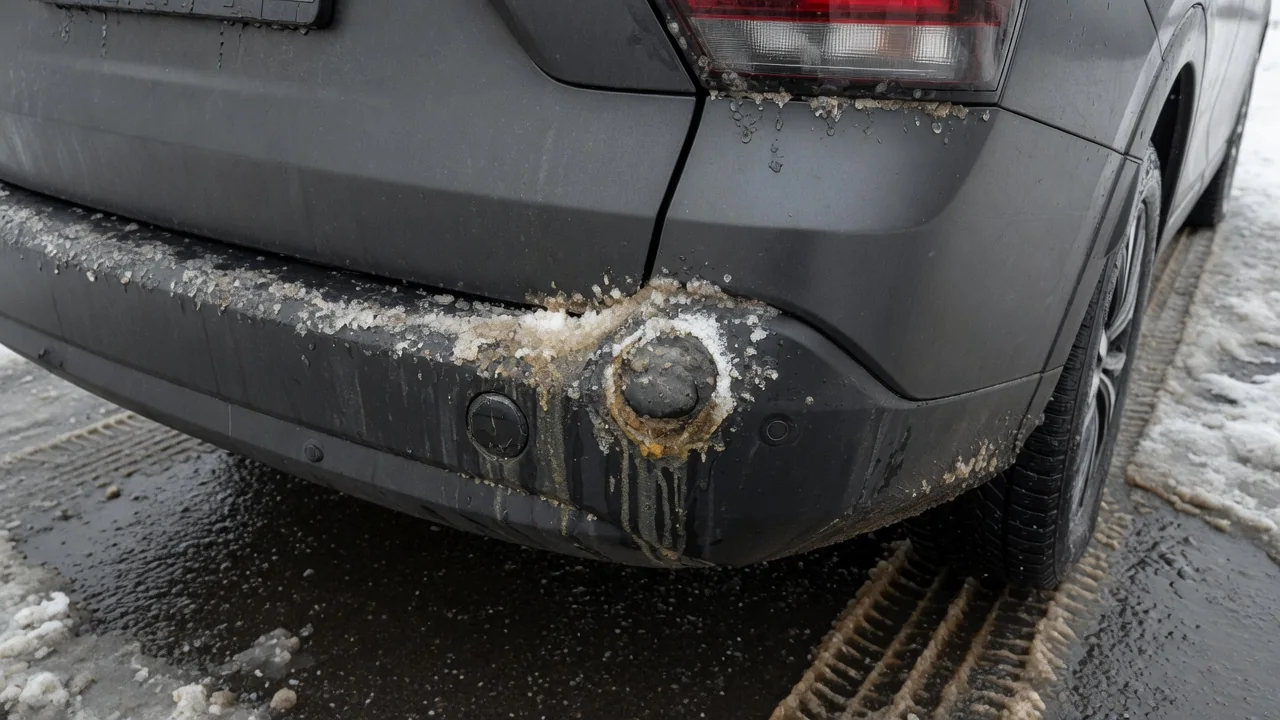
Seeing a Jeep blind spot monitoring temporarily unavailable message on the dash can be unsettling, especially in heavy traffic. In most cases the system has paused because it can't trust what its sensors are reporting. Dirt, weather, towing or an electrical hiccup can all cause that. Knowing the common causes helps you tell a quick fix from a problem that needs a technician.
What the Blind Spot Monitoring Temporarily Unavailable Message Means on a Jeep
When a Jeep shows this message, the blind spot warning system is usually telling you it has switched itself off because the information from its sensors doesn't look reliable. It is a protective pause, not proof that a sensor or module has failed. If the message clears after you clean the bumper or the weather improves, the cause was probably temporary. If the warning stays on or comes back on every drive, something more persistent is likely going on and should be looked into.
While the message is showing, assume you have no blind spot alerts at all. Check your mirrors and look over your shoulder before every lane change, just as you would in a vehicle without driver assistance systems. The exact wording and behavior differ by model, year and trim, so your owner's manual is the best guide to what your display means. If your Jeep has rear cross path detection, that feature may show its own unavailable notice at the same time.
Blocked Rear Corner Sensors: Dirt, Snow, Ice and Accessories
Blind spot monitoring typically uses radar sensors near the rear corners of the vehicle, usually hidden behind the bumper cover. Radar can pass through clean plastic and paint, but it has trouble when that surface is coated with mud, road salt, slush, packed snow or ice. A thick buildup on the bumper corners can absorb or scatter the signal. The system may then show a sensor blocked message or simply report that blind spot monitoring is temporarily unavailable until the surface is clear again.
Accessories can have the same effect. Aftermarket bumpers, hitch-mounted cargo carriers, bike racks, oversized license plate frames, stickers, and thick paint or vinyl wrap near the sensor area can interfere with the radar or sit directly in its path. To clean the area, gently brush away snow and wipe off dirt with a soft cloth and water. Don't hold a pressure washer nozzle close to the bumper corners, and never pry at the bumper cover to reach a sensor, because that can disturb how it's mounted.
Weather, Towing and Driving Conditions That Can Pause the System
Sometimes the bumper looks spotless and the message still appears. Heavy rain, thick spray from trucks or blowing snow can put enough moisture behind the vehicle to confuse the radar, and the system may pause until conditions improve. Long stretches of open highway can play a role too. With few nearby vehicles, guardrails or roadside objects to detect, some systems have a harder time confirming they're working properly and may briefly report themselves unavailable even though nothing is wrong.
Trailer towing also changes things. A connected trailer sits right where the rear corner radar sensors are looking, and the vehicle may change or limit blind spot coverage when it detects one. Your owner's manual explains any trailer-related settings for your model, so check it instead of assuming a particular behavior. It also helps to keep simple notes on when the message shows up: the weather, your speed, whether you were towing and whether it followed a car wash. Those details help a technician spot a pattern quickly.
Electrical Factors: Low Battery Voltage and Recent Service Work
Driver assistance modules depend on steady voltage. A weak battery, a recent jump-start or a battery replacement can trigger driver assistance messages for a while, including a blind spot warning, as the electronics settle. Not every vehicle reacts this way, but it's worth considering. Think back to whether the message started after electrical work, after a new aftermarket accessory such as trailer wiring, a backup camera or extra lighting was installed, or after any other wiring changes near the rear of the vehicle.
Pay attention to what else appears on the dash. If other warnings come on at the same time, such as messages about forward collision, parking sensors or stability control, the cause may be a wider electrical or network communication problem rather than a fault limited to blind spot monitoring. That difference matters for diagnosis. Don't cut into, splice or probe harnesses and connectors yourself, because a bent pin or a poorly sealed splice can create new faults. Electrical diagnosis is best left to a qualified technician.
Bumper Damage, Body Repairs and Sensor Alignment Concerns
Rear corner sensors are aimed precisely, and it doesn't take much to knock them out of position. A minor impact, a bump while parking or contact with a curb or post can shift a sensor bracket or change its angle without leaving visible damage on the bumper. Once the aim is off, the sensor may produce readings the system can't make sense of, and it switches itself off. Bumper cover replacement, refinishing or other body repairs near the sensors can cause similar trouble by changing how the radar sees through the cover.
For that reason, the sensors may need to be checked or calibrated after this kind of work. ADAS calibration uses specialized equipment and procedures to confirm each sensor is aimed and reporting correctly, so owners shouldn't try to bend brackets or re-aim sensors themselves. If the message started after a collision repair, ask the shop whether the driver assistance systems were checked or calibrated before the vehicle was returned, and ask for documentation if they were. A clear answer can save time if the vehicle has to go back.
Safe Owner Checks and When to Get a Professional Diagnosis
A few low-risk checks are worth doing first. Look closely at both rear bumper corners, gently clean off any dirt, ice or snow, and remove temporary items such as a bike rack or cargo carrier. Then park the vehicle, switch it off for a while and restart it to see whether the message clears. Keep in mind what these checks can't tell you. The message alone doesn't identify a failed part, and guessing at a sensor or module can mean paying for parts that don't fix the problem.
Book a professional diagnosis if the warning stays on during clear, dry days, comes back after cleaning, appears with other warnings or started after damage or repairs. A technician can use a scan tool that communicates with the driver assistance modules to read stored fault codes and live data. Those codes are clues, not final answers. Their meaning can depend on the manufacturer and the module, so they need to be checked against the service information for your vehicle. Also do a VIN lookup with the manufacturer or a dealer to see if any open service campaigns apply.