How Does Screen Placement Affect Driver Glance Time?
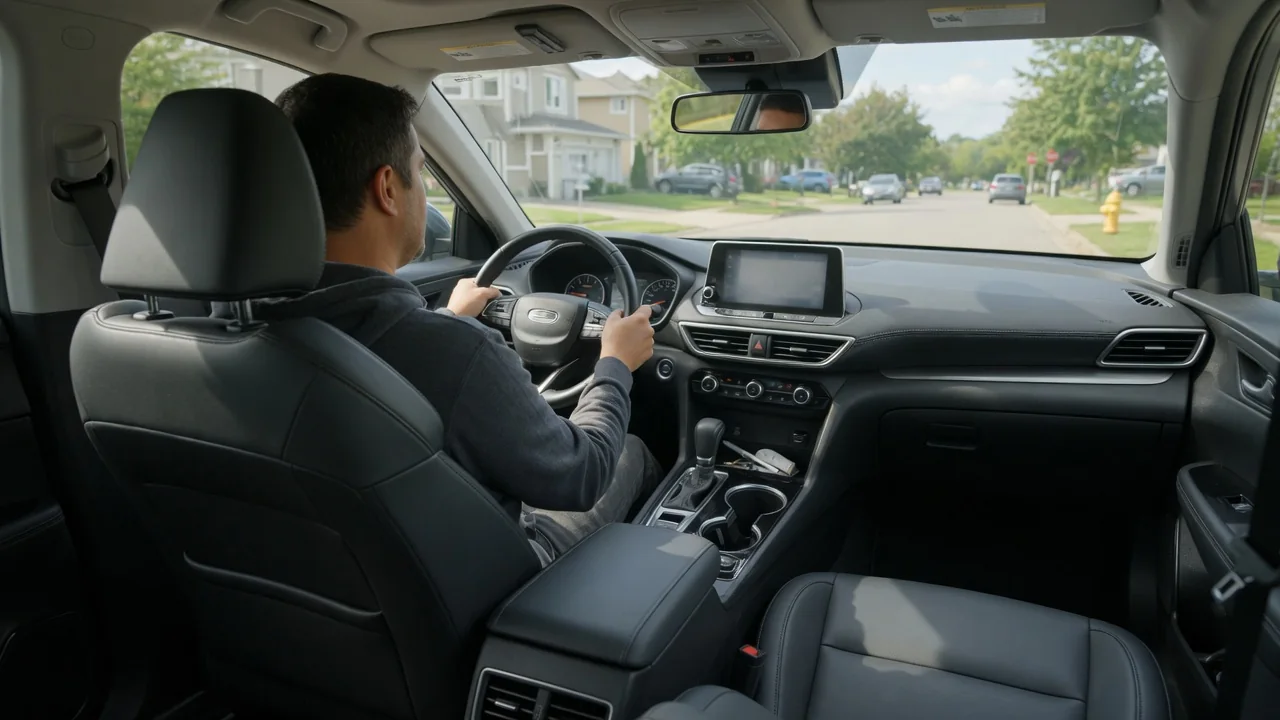
Where a car's display sits has a direct effect on how long a driver's eyes leave the road. A screen mounted high and close to the forward view can usually be read in a shorter, simpler glance than one placed low on the center console. Position is only part of the story, though. This guide explains how screen placement affects driver glance time through eye movement, the way information is organized, and the controls used to operate the display.
Eye Movement: Why Distance From the Road Matters
Every glance at a display involves several steps. The eyes leave the road scene, travel to the screen, refocus, find the needed item, and read it. Then they return to the road and readjust. The farther the screen sits from the driver's normal line of sight, the longer each of those transitions tends to take. The eyes alone can handle small shifts of gaze, but larger angles usually require the head to turn or tilt as well, which adds time to every glance. A display placed high on the dashboard, near the base of the windshield, keeps that angle smaller than one mounted low near the shifter or climate controls.
Position also affects what the driver can still perceive while looking away. When a screen is close to the forward view, part of the road remains within peripheral vision. Movement such as a vehicle braking ahead or a pedestrian stepping out then has a better chance of being noticed. A low-mounted screen pulls the road almost entirely out of view during the glance. Focus distance plays a role too. The eyes must change focus between distant traffic and a nearby display, and this refocusing can be slower for some drivers, particularly those who rely on reading glasses or progressive lenses. Head-up displays aim to reduce both the angle and the focus change by projecting information closer to the road scene. However, they have their own limits on how much content they can show clearly.
Information Hierarchy: Putting the Right Data in the Right Place
Screen placement and information layout work together. Drivers need some information frequently and quickly, such as speed, warnings, and turn-by-turn navigation prompts. That information benefits most from locations near the line of sight, which is why it is commonly shown in the instrument cluster or a head-up display. Secondary information, such as media details or a full navigation map, can sit on a center display. Settings that are rarely changed can live deeper in menus. When the most important items are in the most accessible locations, the average glance becomes shorter because the driver rarely has to search.
Within a single screen, layout determines how many glances a task requires. When key elements stay in the same place, drivers learn where to look, and a familiar glance can go straight to the right spot. Large, high-contrast text and icons take less effort to read. Crowded screens, small fonts, and items that move or change position force the eyes to hunt. Menu depth matters as well. A task that takes several taps through nested screens usually becomes a chain of separate glances, so the total time away from the road can grow even if each glance is brief. Driver distraction guidelines from safety authorities generally consider both the length of single glances and the cumulative time spent on a task. A well-placed screen can still produce long total eyes-off-road time if its information is poorly organized.
Controls: How Reach and Feedback Shape Glance Time
The way a screen is operated influences glance time as much as where it is mounted. Touchscreens offer flexible layouts, but a flat glass surface gives little tactile feedback. Drivers usually need to look at the target to aim a finger, then look again to confirm the input was accepted. Physical knobs, rocker switches, and buttons with distinct shapes can often be found and operated by feel once the driver is familiar with them, so the eyes can stay on the road for much of the task. Steering wheel controls and voice commands can reduce visual demand further. That holds only if they are reliable and simple enough that drivers do not have to check the screen to see whether a command worked.
Car touchscreen placement ergonomics involve a trade-off between seeing and reaching. A screen mounted high and far forward is easier to view but can be harder to touch accurately. This is especially true on rough roads, where the arm is unsupported and the finger may miss small targets. A screen placed lower and closer falls more naturally to hand but moves farther from the road view. Some designs address this by separating display from control, pairing a high screen with a console-mounted dial or touchpad. Others add a ledge or edge where the hand can rest while tapping. Larger, well-spaced touch targets also help because they require less precision and fewer corrective glances.
Practical Implications and Limits
For drivers, the most useful steps are those that reduce the need for long glances in the first place. Adjusting the seat and steering wheel to a proper driving position also sets the viewing angle to the displays, which can make a screen easier to read at a glance. Several habits shift work away from using the screen while moving: • setting destinations, playlists, and climate preferences before driving off; • showing navigation prompts in the instrument cluster or head-up display when the vehicle offers that option; • learning where frequently used functions are located; Brightness and night modes that match ambient light can also reduce the effort of readjusting between screen and road.
Placement alone also has clear limits. No single screen position suits every driver, because seated height, eyesight, age, eyewear, and familiarity with the system all change how quickly a display can be read. Glance behavior also varies with traffic, weather, and road complexity. A placement that feels comfortable on an open highway may demand too much attention in dense city driving. Software design, response speed, and the number of steps a task requires can outweigh mounting location, so a well-positioned screen does not guarantee short glances. Layouts and available settings differ between vehicles, so the owner's manual is the best guide to the display, steering wheel, and voice options a specific car provides.