Ford Locking Hub Fitment Guide
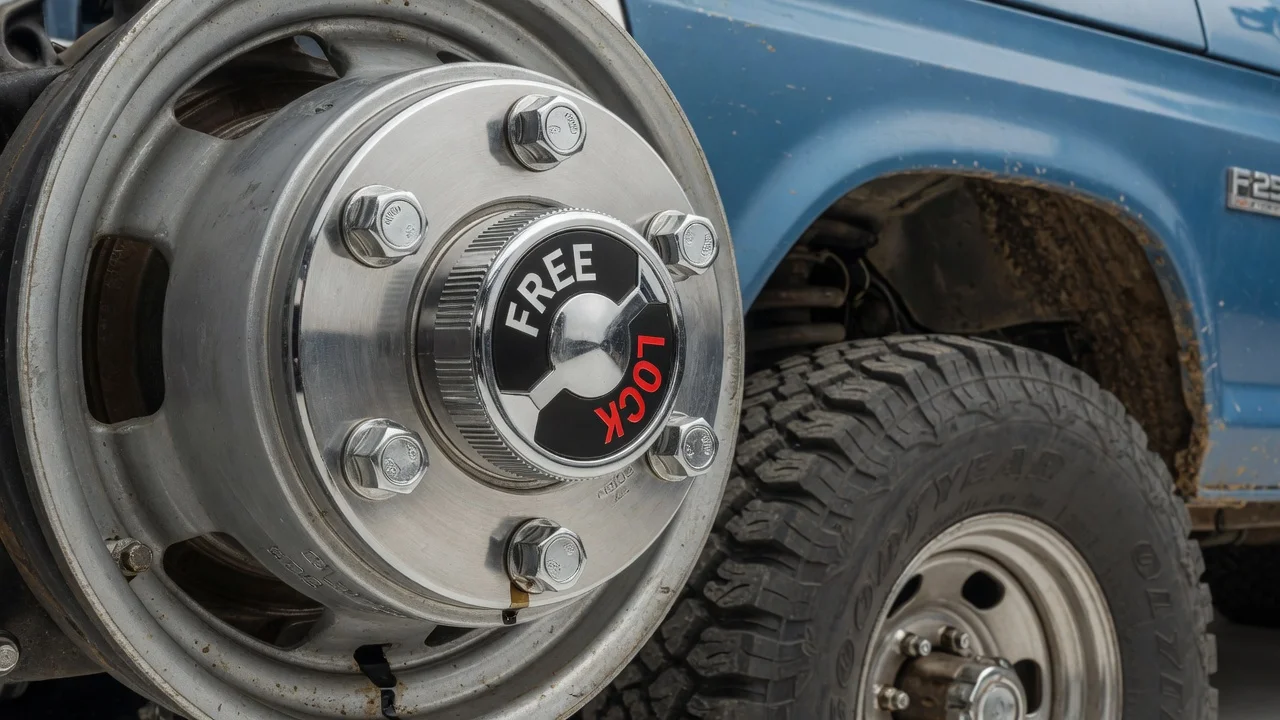
Ford locking hubs are not one interchangeable part. Whether a hub fits your truck or SUV depends on the front axle it actually has, how the factory set up wheel engagement, and what has changed during the vehicle's life. This guide explains how to narrow down the right locking hubs for a Ford four-wheel-drive vehicle, what to confirm before you buy, and when a simple replacement becomes a conversion.
The short answer on fitment
A replacement hub fits when it matches three things: the front axle shaft splines, the mounting pattern on the wheel hub, and the bearing retention hardware used on that spindle. Model and year are a starting point, not a guarantee. Ford used several front axles across its trucks, Broncos, Rangers and early SUVs, and the same nameplate could carry different axles depending on drivetrain, weight rating and production date. Light-duty and heavy-duty versions of the same truck often take different hubs.
The safest approach is to match the hub to the confirmed vehicle configuration rather than to a general description such as a three-quarter-ton 4x4. If the truck still has its original hubs, markings on the old units and the axle identification are the most reliable reference. If the original setup is unknown, measure and count before you order anything.
How locking hubs work on a Ford 4x4
A locking hub connects or disconnects a front wheel from its axle shaft. When the hub is free, the wheel spins on its bearings while the front axle shafts, differential and front driveshaft stay largely idle in two-wheel drive. That reduces drag and wear on front driveline parts during ordinary road driving. When the hub is locked and the transfer case is shifted into four-wheel drive, torque from the front differential reaches the wheels.
Manual hubs use a dial on the hub cap that the driver turns between lock and free at each wheel. Inside, a clutch ring slides to couple a splined inner drive on the axle shaft with the hub body bolted to the wheel hub. Because engagement depends on those parts meshing, the hub's inner drive must share the spline count and diameter of the axle shaft, which is why hubs that look nearly identical can be incompatible.
Automatic hubs engage on their own when the axle shaft begins delivering torque, and many designs release only after the transfer case is back in two-wheel drive and the vehicle is driven a short distance in reverse. Some later Ford systems use vacuum-actuated wheel ends controlled by the vehicle, and many newer models have no owner-operated hub at all.
What changes the right hub for your truck
Axle type is the biggest variable. Different front axles use different shaft spline counts, hub bolt patterns and spindle nut arrangements, and Ford changed axles across generations and weight classes. A truck can also leave the factory with one engagement system and receive another later, so the parts on the vehicle today may not match its original build.
Factory automatic hubs and manual hubs are often not a direct swap. Many automatic designs use their own bearing retention parts, so moving to manual hubs may require different spindle nuts, washers or a dedicated conversion kit. Vehicles with vacuum-actuated wheel ends add another layer, because removing that system can affect how the four-wheel-drive controls behave. Treat these changes as conversions that need the complete parts list for your exact vehicle.
Operating conditions shape the choice among hubs that already fit. Frequent mud, water crossings and road salt expose hubs to moisture and grit, so sealing and ease of service matter. Heavy loads, larger tires and hard off-road use put more stress on internal parts. These factors help you pick between compatible hubs; they do not change which hubs physically fit.
How to identify and check what you have
Start with identification. The certification label in the driver's door area records build details, and the front axle housing often carries a tag or cast markings that identify its type. Your service history may show whether the front axle, hubs or wheel bearings were replaced, and old receipts sometimes list part numbers. Compare this information with the replacement hub listing, which should name the year range, model, axle and engagement type it covers.
If the records are incomplete, inspect the hub directly. With the outer hub assembly removed, count the axle shaft splines, count the hub mounting bolts or studs, and note how the wheel bearings are retained. Write down any numbers stamped or cast on the old hub body. These observations let a parts supplier or mechanic confirm a match even when the vehicle's history is unclear.
Before replacing a hub that seems faulty, confirm the problem. With the front wheel safely raised, set the hub to free and check that the wheel turns without turning the axle shaft; set it to lock and the shaft should turn with the wheel. Look for a stiff or broken dial, water or rust inside the hub, missing snap rings and worn splines. Always set both manual hubs to the same position, follow manufacturer specifications for bolt torque and bearing adjustment, and check the maintenance schedule in your owner's manual, which may recommend engaging four-wheel drive periodically to keep front driveline parts lubricated.
Limitations and next step
No single chart covers every Ford locking hub application. Mid-year production changes, previous repairs and aftermarket conversions can make a catalog listing wrong for a particular vehicle. This guide gives a method for narrowing fitment; it does not replace the parts catalog entry or service information for your exact truck.
Get professional help if a hub will not engage after replacement, if you find wheel bearing play, grinding or damaged splines, or if the vehicle uses vacuum-actuated or electronically controlled wheel ends. A mechanic with the correct service information can confirm the axle, check related parts and set bearing adjustment correctly. For a straightforward manual hub replacement, the next step is to gather the identification details above and match them to a listing that names your exact configuration.