Which Direction to Turn Ford F-250 Locking Hubs
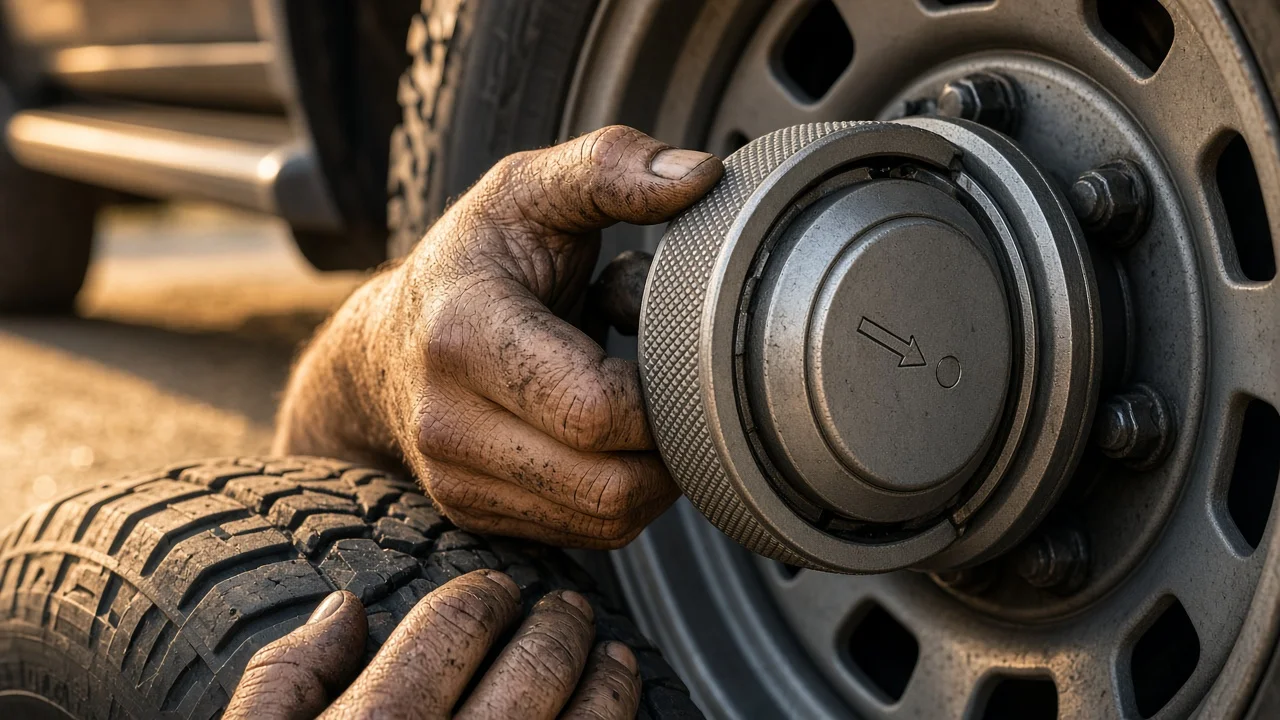
If your Ford F-250 has manual locking hubs, you have to set them by hand before four-wheel drive can drive the front wheels. Many owners wonder whether the dial turns clockwise or counterclockwise, especially the first time they use it. The reliable answer comes from the hub itself rather than a rule of thumb. This guide explains how to read the dial, what the hub does inside, how your truck's configuration affects the procedure, and when a stiff or damaged hub needs inspection.
The short answer
Turn each hub dial until its pointer or arrow lines up with the LOCK marking to engage the front axle. Turn it the other way, to FREE, to disengage it. The markings stamped or molded into the dial face are the authority. Hub designs differ between model years, factory and aftermarket parts, and the left and right sides of the truck, so a single clockwise or counterclockwise rule is not dependable. If the markings are worn away, check the owner's manual for your model year or have the hub identified before relying on memory.
Two qualifications apply every time. Both front hubs must be set to the same position, and the dial must be turned fully into its detent rather than left between positions. A hub that sits partly engaged can slip or grind under load, and one locked hub with one free hub will not give you proper front-wheel drive.
How manual locking hubs work
On a four-wheel-drive F-250, the front axle shafts and the wheel hubs are separate parts. When the hubs are in FREE, the wheels spin on their bearings while the axle shafts, front differential and front driveshaft stay mostly still. This reduces drag and wear on front driveline parts during normal two-wheel-drive driving on pavement.
Turning the dial to LOCK moves an internal clutch ring that connects the splined end of the axle shaft to the hub body. Once locked, the wheel and axle turn together. The hubs alone do not create four-wheel drive, though. The transfer case still has to be shifted into 4H or 4L to send power to the front axle. Locking the hubs simply makes the connection possible; leaving the transfer case in 2H with the hubs locked means the front axle turns with the wheels but receives no drive.
What changes the answer on your truck
The F-250 has been built across many generations, and the hub setup depends on the exact vehicle configuration. Older full-size F-250 four-wheel-drive trucks and many earlier Super Duty models commonly used manual hubs with LOCK and FREE positions. Other Super Duty trucks use automatic locking hubs that engage when the transfer case is shifted. Some automatic hubs have a dial with AUTO and LOCK positions that serves as a manual override, while others have no dial at all. If your hubs show AUTO instead of FREE, the procedure is different from a purely manual hub, and the owner's manual for your year should be your guide.
Replacement parts also change the picture. Many trucks are now on aftermarket hubs, which may use different labels, a different amount of rotation between positions, or a different feel at the detent. A truck with an unknown service history may even have mismatched hubs from different sources. Check both sides rather than assuming they match.
Operating conditions matter too. Mud, ice, road salt and corrosion can make a dial feel stuck, which can lead an owner to assume it turns the other way. Stiffness alone does not tell you the direction, so read the markings first and look for debris around the dial before applying more effort.
How to lock and unlock the hubs correctly
Stop the truck on a safe surface and put it in park or set the parking brake. Wipe any dirt off the dial so you can clearly see the markings and pointer. Grip the dial by hand and turn it firmly toward LOCK until it seats in its detent. Repeat on the other front wheel, then shift the transfer case into four-wheel drive according to the owner's manual. Do not use pliers, wrenches or a hammer on the dial; many dials are plastic or lightweight metal and can crack, and forcing one can damage the internal parts.
If a dial will not turn fully, the internal splines may not be lined up. Rolling the truck a short distance forward or back, then trying again, often lets the clutch ring slide into place. When unlocking, shift the transfer case back to 2H first, then turn both dials to FREE. If a dial resists going to FREE, the driveline may be holding tension; moving the truck a short distance in the opposite direction from your last travel can release it.
After setting the hubs, a short check is worthwhile. Listen for clicking or grinding from the front wheels when you start moving, and confirm that both dials still point to the same marking. On a truck you have just bought, test the hubs in a safe place before you actually need four-wheel drive, so you know whether they engage and release properly. Some owner's manuals also recommend engaging four-wheel drive periodically to keep front driveline parts lubricated; follow the maintenance schedule for your specific truck rather than a generic interval.
When to stop and get help
Without seeing the hub, nobody can tell you its direction with certainty, and that is why the markings and the owner's manual for your model year take priority over general advice. If the labels are missing, the dial spins freely without clicking into a position, the front wheels make noise after locking, or the truck behaves as if four-wheel drive is not engaging, have the hubs inspected. These symptoms can point to worn internal parts, a broken dial, the wrong hub for the axle, or a problem elsewhere in the front driveline.
Hub service usually means removing the hub assembly and checking it against the manufacturer specifications for your axle, which calls for the correct parts and torque values for that exact vehicle. If you are not comfortable doing that work, a qualified mechanic can identify the hub type, check its condition and confirm whether it suits your truck. Bring the model year, cab and drivetrain details, and any record of replacement hubs, so the inspection starts with accurate information.