Can Other EVs Use Tesla Charging Stations?
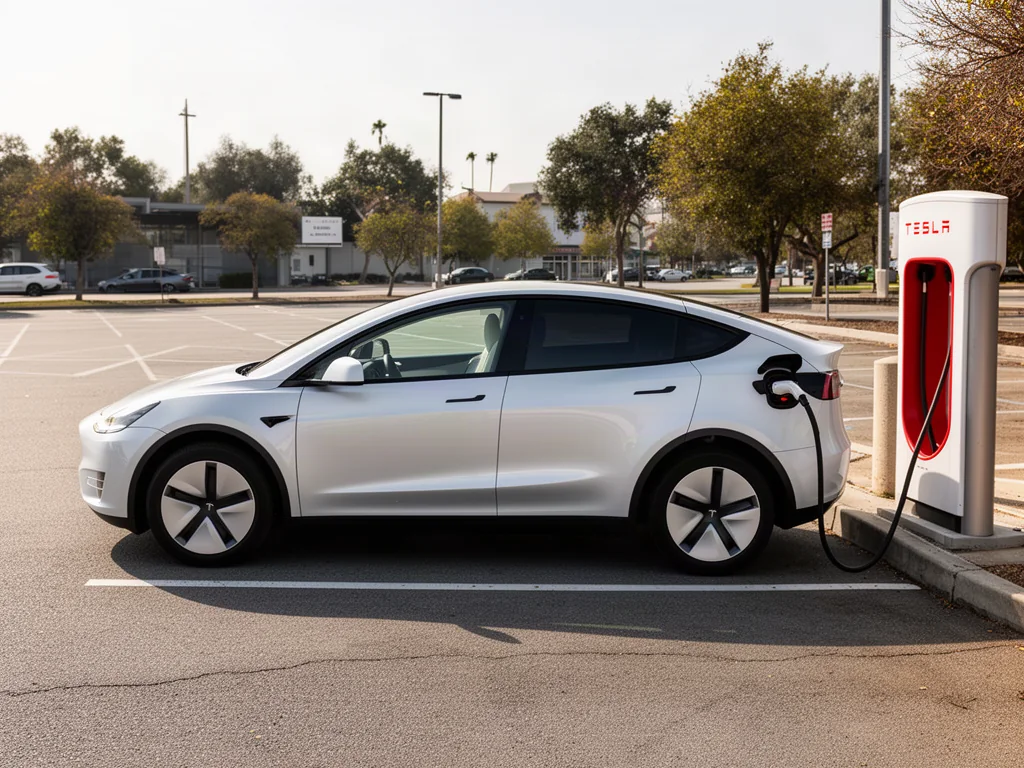
Tesla electric car charging stations now serve some non-Tesla drivers, yet compatibility is never automatic. Supercharger access and Destination Charging both depend on the vehicle, the connector, the site, and how the session is authorized. US drivers should treat Tesla electric car charging as a planned stop, not a guaranteed plug-and-charge visit, and verify the stall before counting on it.
When a Non-Tesla EV Can Use a Tesla Charging Station
Some non-Tesla EVs can use eligible Tesla charging stations in the United States, but access is conditional rather than universal. The vehicle must be approved for the site, the connector must match the charge port either natively or through an approved charging adapter, and the session must be authorized. Supercharger access and Destination Charging each have their own rules. If the vehicle, site, connector, or authorization is wrong, the car may sit at a Tesla electric car charging station without ever drawing power.
A map pin or a plug that appears to fit does not prove the car can charge. Tesla electric car charging stations vary by hardware generation, software, and who is allowed to start a session. Before checking access, note the exact model and model year, because two years of the same nameplate can differ. Then identify the charge-port type and any automaker requirements, such as a software update or a supported adapter, so the eligibility search matches the actual vehicle rather than a similar one.
Identify the Charging Equipment at the Location
Superchargers provide DC fast charging, which sends high-power direct current into the battery pack instead of using the car's onboard AC charger. Because that path requires vehicle-to-station communication, the specific Supercharger site still has to support the EV. Destination Charging generally provides AC charging at hotels, restaurants, and similar properties. Those units typically feed the onboard charger at a slower rate, and the host may restrict use to guests, customers, or posted hours even when the hardware is physically available.
App listings, equipment labels, and host notes help identify the connector type and the access conditions at that stall. Look for whether the unit is a Supercharger or a destination charger, which plug is installed, and any statement about non-Tesla use. One property can mix equipment, with Tesla-only stalls beside newer units that accept other brands. Drivers should inspect the actual charger they intend to use rather than treating every Tesla electric car charging station on the same lot as interchangeable.
Confirm Supercharger Eligibility for Your EV
Eligibility starts with the Tesla app and the automaker's charging information, both checked against the exact vehicle. The Tesla app can indicate which Supercharger sites currently accept non-Tesla EVs. The automaker's app, owner's information, or dealer can show whether that model year is included, whether a software update is required, and which adapter is supported. When those sources conflict or leave the vehicle unlisted, treat Supercharger access as unconfirmed until the mismatch is resolved.
Selected Supercharger sites include Magic Dock, an integrated adapter that lets a CCS1 charge port connect without a separate dongle. Other eligible sites still require an approved charging adapter that the automaker supplies or supports. A native NACS connector, also called SAE J3400, does not by itself authorize the vehicle on every Supercharger. Network permission is a separate step from the physical plug. Access arrangements and site settings can change, so recheck eligibility while planning the trip and again before arrival.
Choose an Adapter Approved for the Charging Task
The NACS connector, standardized as SAE J3400, is the plug family used on Tesla Superchargers and Destination Charging equipment, and some non-Tesla cars now carry it as a native port. CCS1 remains the combined DC inlet on many US EVs built for other networks. The J1772 charge port handles AC charging and also forms the upper portion of a CCS1 inlet. Matching the vehicle port to the stall shows whether an adapter is needed and whether the connection is meant for AC charging, DC fast charging, or both.
An AC adapter used at Destination Charging and a DC adapter used at a Supercharger are not the same part. The AC path supplies the onboard charger at a slower rate. The DC path carries Supercharger current through a different electrical route. Automaker instructions and Tesla charging network instructions need to agree on that hardware for the vehicle. The adapter does not create Supercharger access. Chaining adapters together can overheat or refuse to latch, and a modified connector or homemade extension creates the same risk.
Plan and Start an Eligible Charging Session
Before leaving, look at stall availability, property hours, and parking rules. Destination Charging often needs host permission or guest status. Set up any required Tesla or automaker account and payment method in advance. Starting a session may use the Tesla app, the automaker app, or a supported automatic authorization when the vehicle is plugged in, and the driver should follow those prompts. Park in the marked space so the cable reaches the port without stretching or blocking neighboring stalls.
Charging speed and session length are not set by the stall's peak number alone. The vehicle decides how much current it will accept based on its own limits, battery condition, and state of charge, and output often tapers as the pack fills. Shared site power and weather can reduce the rate further. Review the energy charge shown in the app or on the display, along with any parking, idle, or congestion fees. Move the car once you have enough range so the stall is free.
Handle Access Problems and Charging Failures Safely
An unavailable or unauthorized charger is not the same as a failed charging session, and neither one proves the vehicle has a hardware fault. A stall can be offline, Tesla-only, or rejecting the account. A session that starts and then stops can involve communication, adapter seating, or temperature limits. Check that you selected the correct stall, that the account is active, and that the compatibility listing still includes the vehicle. Read the app and dashboard messages before assuming a part has failed.
Stop and leave the equipment untouched if a cable, connector, or adapter looks damaged, feels unusually hot, produces smoke, or gives off a burning smell, then contact site or network support. Repeated failures across different stalls may involve the charge port, onboard charging hardware, software, or adapter, which belongs with the automaker or a qualified technician. Any stored diagnostic codes are clues for that inspection, not proof a part has failed. Identify a compatible backup location before depending on a single Tesla site.