Bluetooth OBD2 Scanners: How the Adapter and Phone App Work Together
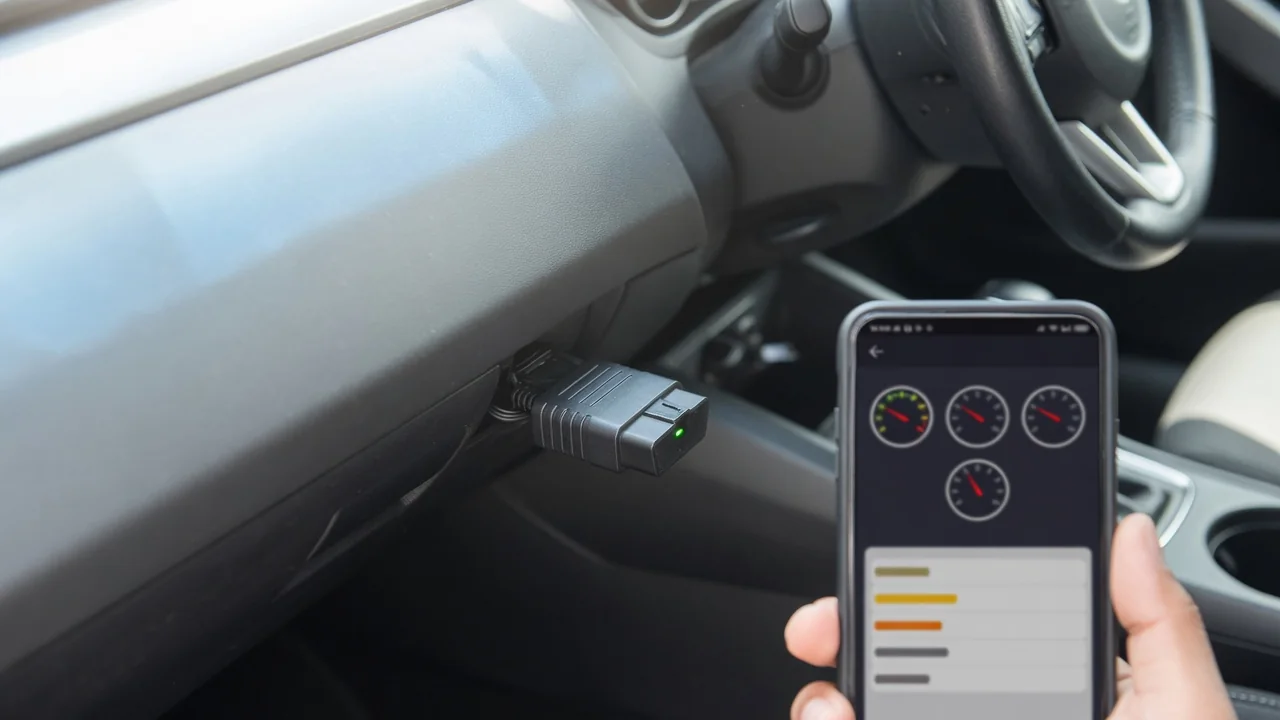
An OBD2 Bluetooth scanner app turns a phone into a basic scan tool, but only when it is paired with a small adapter plugged into the car. Understanding what each half does, and what neither can do, helps you read a check engine light sensibly, avoid unnecessary parts, and know when a technician's equipment is the better choice.
What a Bluetooth OBD2 Scanner Is and How It Talks to Your Car
A Bluetooth OBD2 scanner is a compact adapter that plugs into the vehicle's standardized OBD-II port, usually found under the dashboard near the steering column. It needs no battery of its own because the port supplies power. Inside, a small chip listens to the messages the car's control modules exchange over their network, repackages the requested ones, and sends them wirelessly to a phone or tablet.
The adapter only makes the connection; the app does the interpreting and displaying. That split matters, because a capable adapter paired with a limited app, or the reverse, produces limited results. The car sets the final boundary. Its onboard computers decide which data they will release through the diagnostic port, so no scanner can report a sensor reading or a diagnostic trouble code that the vehicle does not expose.
How an OBD2 Bluetooth Scanner App Turns Raw Data Into Readable Information
The vehicle diagnostics app works by asking questions. It sends a request through the adapter, receives a reply in raw numeric form, and decodes it into something readable: a stored code with a description, a gauge, or a saved report. Most apps can read and clear codes, show freeze frame data captured when a fault was logged, display live sensor data, and list the readiness monitors that indicate whether the emissions self-tests have completed.
Apps differ in depth. Some carry only generic code descriptions, while others add manufacturer-specific data for certain makes, sometimes as an optional extra. Not every app supports every adapter or vehicle either, so check compatibility before relying on one. It is also worth reviewing the permissions the app requests and its data-sharing settings, since diagnostic records and location information may be collected and uploaded.
Pairing the Adapter and Making the First Connection
The general sequence is simple. With the vehicle parked and the engine off, locate the port and push the adapter in firmly. Switch the ignition on so the control modules wake up, then complete Bluetooth pairing and select the adapter inside the app. Some adapters pair through the phone's Bluetooth settings, while others connect only from within the app and may fail if paired the other way, so follow the instructions supplied with the adapter.
Most failed first connections have ordinary causes. The phone may be trying to reach a different Bluetooth device, such as the car's audio system, so confirm the adapter's name is the one selected. The ignition may be off, leaving the modules silent even though the adapter's light is on. Or the app may simply not support that adapter, which its compatibility notes should reveal. Do all of this while parked, never while driving.
Reading Trouble Codes Without Jumping to Conclusions
Codes fall into two broad groups. Generic powertrain codes have standardized meanings that apply across vehicles, so an app's description is a reasonable starting point. Manufacturer-specific codes are different: their meaning varies by make, model and year, and an app's generic library may mislabel them. Confirm any such code against the manufacturer's service information or with a qualified technician before drawing conclusions from it.
Even a correctly defined code identifies the circuit or system that reported a fault, not the part that failed. A sensor code can come from wiring, a connector, a leak or another component upsetting the reading, so buying parts on a code alone can waste money. Freeze frame data and the pattern of symptoms narrow the possibilities without proving them. Clearing codes erases that freeze frame and resets the readiness monitors, which can hide a problem and leave the car not ready for an emissions inspection.
Using Live Data Safely and Understanding What It Shows
Live data shows what the engine computer is seeing in the moment: engine speed, coolant temperature, fuel trim, oxygen sensor activity and similar values, depending on what the vehicle supports. The numbers mean little in isolation. Normal ranges differ between vehicles and change with temperature, load and altitude, so compare readings with the manufacturer's specifications for that vehicle rather than generic figures found elsewhere.
Watching gauges is a job for a passenger or for a parked car. The driver should not handle or study the phone while the vehicle is moving; if a reading under driving conditions matters, have someone else observe or use the app's logging and review it afterward. Bear in mind that Bluetooth sampling can be slower than professional equipment, particularly with many values selected at once, so brief dropouts or spikes may not be fully captured.
Limits of a Bluetooth OBD2 Scanner and When Professional Testing Is Needed
Many basic adapters and apps reach only engine and emissions data. Access to brakes, airbags, transmission or body systems varies with the adapter, the app and the vehicle, and should not be assumed. An empty code list therefore does not mean every system is healthy. Warnings involving airbags, braking or steering call for professional inspection rather than home interpretation or code clearing, because the consequences of a wrong guess are serious.
Some signs need prompt professional attention regardless of what the app shows: a flashing check engine light, overheating, loss of power, unusual smells, or warning lights that arrive with a change in how the car drives. Pinpoint diagnosis often depends on electrical testing, smoke tests or manufacturer-level tools that a phone-based scanner cannot provide. The most useful contribution is observation: record the codes, freeze frame values and conditions when the symptom appeared, and pass them to the technician.
Everyday Care: Leaving the Adapter Plugged In, Battery Drain and Security
An adapter left in the port may keep drawing a small amount of power while the car is parked. Whether that matters depends on the device and how it sleeps, so check the adapter's guidance, especially for a vehicle that sits unused for long periods. Physical fit matters too. A bulky or loose adapter can be struck by the driver's knee, and it must never sit where it could interfere with the pedals or controls.
A powered adapter is also a wireless doorway into the vehicle's diagnostic network. If the device or app offers no pairing protection, such as a PIN or a button that must be pressed to pair, unplug it or switch it off when it is not in use to limit unwanted connections. Keep the app and the adapter's firmware up to date, and install updates only through the official app or the vendor's own channels.