Automatic Emergency Braking Warning Light: What It Means and What to Do
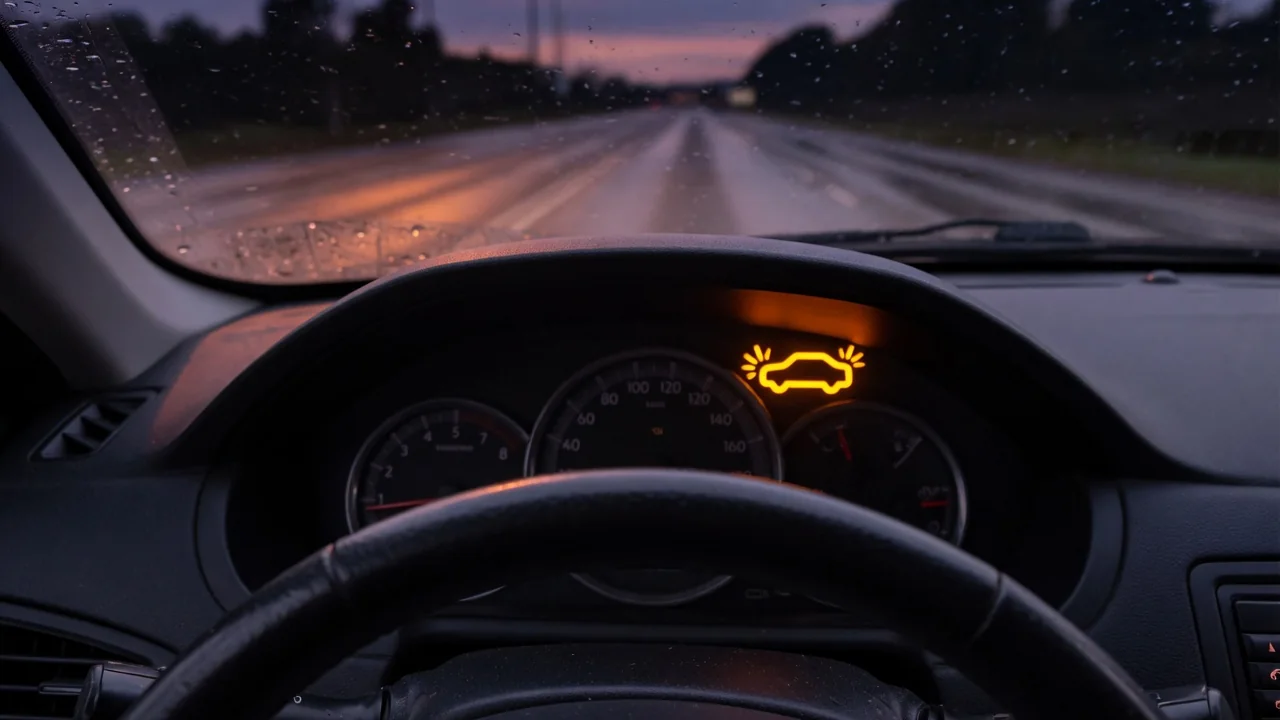
An automatic emergency braking system warning light can appear suddenly and leave you unsure whether your car is still safe to drive. In most cases it means a driver assistance feature is switched off, temporarily unavailable, or reporting a fault. Here is what the AEB light and symbol usually mean, how Nissan owners should read the warning, and which checks are reasonable before you get professional help.
What an Automatic Emergency Braking Warning Light Is Telling You
Automatic emergency braking watches the road ahead with forward-facing sensors. These are typically a front radar sensor, a windshield camera, or both. When the system decides a collision with a vehicle or obstacle is likely, it usually gives a forward collision warning first. If the driver doesn't react in time, it can apply the brakes on its own. Because it needs clear sensor data and working electronics, the vehicle keeps checking whether the system can operate, and the warning light is how it reports that status.
An automatic emergency braking light generally means one of three things: the feature has been turned off, it is temporarily unavailable, or it has found a fault. Your owner's manual explains what each state means for your vehicle. The light's behavior, color and accompanying messages differ by manufacturer, model and year, so no single meaning applies to every car. An AEB warning normally does not mean your regular brakes have stopped working. It does mean you shouldn't count on collision assistance until you confirm the system's status.
How to Recognize the AEB Symbol and Related Pedestrian Detection Alerts
The automatic emergency braking symbol is often drawn as a vehicle with impact lines, wave marks or an object in front of it. It may also include the letters AEB or the word OFF. Designs vary, so compare what you see with the symbol chart in your owner's manual rather than a generic image. Also notice how the indicator behaves. A steady light, a flashing light and a text message on the instrument cluster can each mean something different, and manufacturers assign those meanings differently.
An automatic emergency braking with pedestrian detection system warning light may share the main AEB indicator, or the system may show its own instrument cluster message when pedestrian detection is limited. Check your manual to see which setup your vehicle uses. The AEB indicator is also easy to confuse with similar-looking lights, such as the forward collision warning icon, the traction control symbol or the red brake system warning. A red brake warning points to the conventional braking system, and it needs prompt attention on its own.
Why You Might See an 'AEB System Off' Warning
An automatic emergency braking AEB system off warning light often appears simply because the feature was switched off. On many vehicles the driver can turn off AEB in a settings menu or with a dedicated button. Some systems switch back on at every restart, while others remember the last setting. The system may also report that it is off or temporarily unavailable when it can't see properly. Manufacturers commonly list a dirty, iced or blocked sensor area, heavy rain, snow or fog, and bright glare, but the exact list depends on the vehicle.
Some designs also disable AEB when a related system, such as stability control, is turned off or has a fault. Check the manual for this instead of guessing at the connection. To narrow down the cause, open the driver assistance settings and confirm the feature is enabled. If the message showed up in a snowstorm or heavy road spray, wait for conditions to improve, park safely, clean the sensor area and restart the vehicle. A warning that clears points to a temporary condition. One that returns in clear weather needs a closer look.
Nissan Automatic Emergency Braking Warning Light: Reading It Correctly
A Nissan automatic emergency braking warning light may appear as an indicator, a cluster message, or both. The wording and behavior vary by model and year. Some Nissan systems treat forward emergency braking and pedestrian detection as separate functions, while others group them with other driver assistance systems. Your most reliable reference is your own owner's manual or the vehicle information display, which often describes the condition in text. Reading the exact message is better than relying on a general description of the automatic emergency braking light on Nissan vehicles.
Several general conditions can turn on the Nissan AEB system warning light. These include dirt, snow, ice, stickers or accessories near the front sensor or camera area, and bad weather that limits what the sensors can detect. Sensor placement differs between models, so use your manual to find the areas that matter on your vehicle. If a steady warning stays on after you clean those areas and restart in good conditions, have a Nissan dealer or qualified technician inspect it. A warning that persists in clear weather is more likely to reflect a fault or a calibration problem.
Flashing AEB Light on a Nissan Rogue or Other Nissan Models
An automatic emergency braking light flashing on a Nissan can mean different things depending on the vehicle. On some systems, flashing signals an active warning or braking event. On others, it indicates a system condition. Check the manual for your exact model and year. If your Nissan Rogue's automatic emergency braking light is flashing, note when it happens: while approaching traffic, at startup, or seemingly at random. Also note any messages, warning sounds or brake activity that come with it. That context helps a technician tell normal operation apart from a problem.
Some drivers report warnings or braking that seemed to happen without a reason. Objects such as overhead structures, roadside items or vehicles in nearby lanes are sometimes blamed, though how often this occurs can't be stated in general terms. If it happens to you, write down the date, time, location, weather and traffic conditions so you can share them with a technician. Report unexpected automatic braking, or repeated flashing with no clear cause, to a dealer promptly. You can also check for open recalls by entering your VIN through official manufacturer or federal recall lookup tools.
Safe Checks You Can Do and When Professional Diagnosis Is Needed
The safe owner checks are simple. Park in a safe place and confirm AEB is enabled in the settings menu. Gently clean dirt, snow or ice from the front sensor area and from the outside of the windshield in front of the camera, using a soft cloth rather than a scraper. Then restart the vehicle. Don't unplug connectors, adjust or remove sensors, or cover warnings with aftermarket devices. Radar sensors and cameras often need calibration with special equipment, and disturbing them can create new problems.
Windshield replacement, front-end collision repair, bumper work or ride height changes can all affect sensor alignment. If any of these were done recently, ask a shop to confirm whether sensor calibration is needed. Any related trouble codes need a professional scan tool and the manufacturer's service information to interpret. Code meanings depend on the manufacturer, and a stored code is evidence to investigate, not proof that a part has failed. Until a technician confirms the system works, leave extra following distance and stay fully attentive.