ABS Wheel Speed Sensor Location and Identification
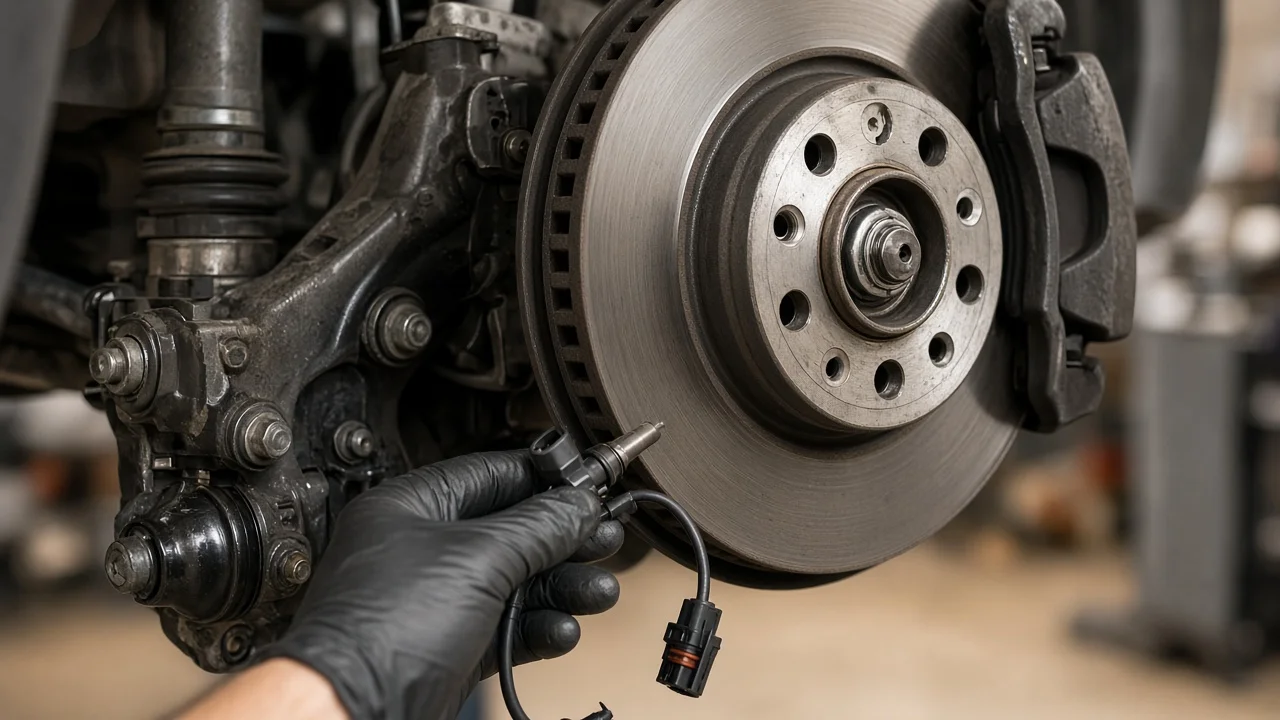
When the ABS warning light comes on, a scan tool often points to a wheel speed sensor, and the next question is where that part actually sits. On most modern cars and light trucks there is one sensor at each wheel, mounted close to the hub. This guide explains where to look, how to tell the sensor apart from nearby brake components, and which designs place it somewhere else.
Where the ABS wheel speed sensor is located
On a typical four-wheel ABS system, each wheel has its own speed sensor. At the front, the sensor is usually bolted into the steering knuckle just behind the brake rotor. It points at a toothed ring or magnetic encoder that turns with the hub or the outer CV joint. At the rear, it is normally mounted in the knuckle, hub carrier or axle housing in the same way. The sensor itself is a small plastic or metal-bodied probe, often held by a single bolt, with a wire lead running out of it.
That wire is the easiest way to confirm what you are looking at. It is usually routed along the strut, control arm or flexible brake hose with clips or brackets, then up to a connector in the wheel well or under the body. A thin wire that plugs into the brake pads is a pad wear sensor, not the ABS sensor. The rubber hose that carries brake fluid to the caliper has no electrical connector at all.
How the sensor reads wheel speed
The sensor watches a ring of evenly spaced teeth, slots or magnetic poles that rotates with the wheel. Each tooth or pole passing the sensor tip produces a pulse, and the ABS control module counts those pulses to calculate how fast that wheel is turning. The module compares all the wheels. If one is slowing much faster than the others under braking, that wheel is about to lock, and the module modulates brake pressure to it.
Two main sensor types are in use. Older passive sensors are magnetic pickups that generate their own alternating voltage, and that signal grows weaker at low speed. Newer active sensors use Hall effect or magnetoresistive elements. The module supplies them with power, and they send a digital signal that works down to very low speeds. The sensor tip sits only a small distance from the ring, so rust buildup, metal debris or a cracked ring can disturb the signal even when the sensor itself is fine. Many vehicles also share this data with traction control and stability control, and on some vehicles with the speedometer.
Designs that change the sensor location
Many vehicles use a sealed hub bearing assembly with the sensor built in, or with the magnetic encoder hidden inside the bearing seal. In that case you may see only a connector or a short pigtail coming out of the hub, and on some designs the sensor cannot be replaced separately from the hub. Many front-wheel-drive cars of older design have the toothed ring pressed onto the outer CV joint. On those cars the sensor points at the axle rather than at the hub face.
Some older rear-wheel-drive pickups and vans use rear-wheel-only ABS or a three-channel system that monitors both rear wheels together. On these, the rear sensor is often mounted in the differential housing and reads a ring on the ring gear or carrier, rather than sitting at each rear wheel. Other designs take rear speed from a sensor at the transmission or transfer case output, which is easy to confuse with a vehicle speed sensor. Solid rear axles and independent rear suspensions also route the wiring differently.
Left and right sensors are frequently different parts, and front and rear sensors usually do not interchange. Cable length, connector style and mounting angle all vary with vehicle fitment. Confirm the correct part by year, model and drivetrain, or by VIN, before buying.
How to find and identify the sensor yourself
Start with a scan tool that reads ABS codes, not just engine codes. The code or live data usually identifies the wheel position, such as left front, which narrows the search to one corner. If your tool shows live wheel speed readings, watch them while the vehicle rolls slowly. A sensor that drops out or reads differently from the others is the likely suspect.
To inspect the sensor, park on level ground and chock the wheels. Lift the vehicle with a proper jack and support it on jack stands before removing the wheel. Look behind the rotor for the sensor body and its bolt, then trace the lead back to the connector. Check for a chafed or cut wire, a loose clip, a corroded connector, or a sensor body pushed out of position. Where the tone ring is visible, look for cracks, missing teeth, heavy rust or debris stuck to it. If you want an ABS wheel speed sensor diagram, use one from service information for your exact vehicle, since generic images rarely match real wire routing.
Take care around the sensor during other brake work. Replacing brake pads or brake rotors, or removing a caliper, can stretch or pinch the harness if it is left hanging, and prying can damage the sensor tip. A wheel speed sensor job normally does not require opening the hydraulic system or touching brake fluid, so leave the brake lines closed.
Limitations and when to get professional help
This guide describes common layouts, not every vehicle. Exact sensor position, bolt torque, any required air gap and wiring routes come from service information for your specific vehicle. Some hub-integrated designs must be replaced as an assembly. A seized sensor can break off in the knuckle during removal, and a corroded mounting bore sometimes needs cleaning or repair before a new sensor will seat properly.
An amber ABS light on its own usually means the anti-lock function is disabled while normal braking remains, but stopping distances on slippery roads can increase. Stop driving and have the brakes inspected by a qualified technician if any of these happen: the red brake warning light comes on as well, the pedal feels low or soft, the vehicle pulls, or grinding noises suggest the friction material is worn past its wear limits. ABS codes that persist after a sensor replacement also call for professional diagnosis, because the fault may be in the wiring, the tone ring or the control module.