2005 GMC Envoy Front Axle Actuator Fitment: How to Get the Right Part
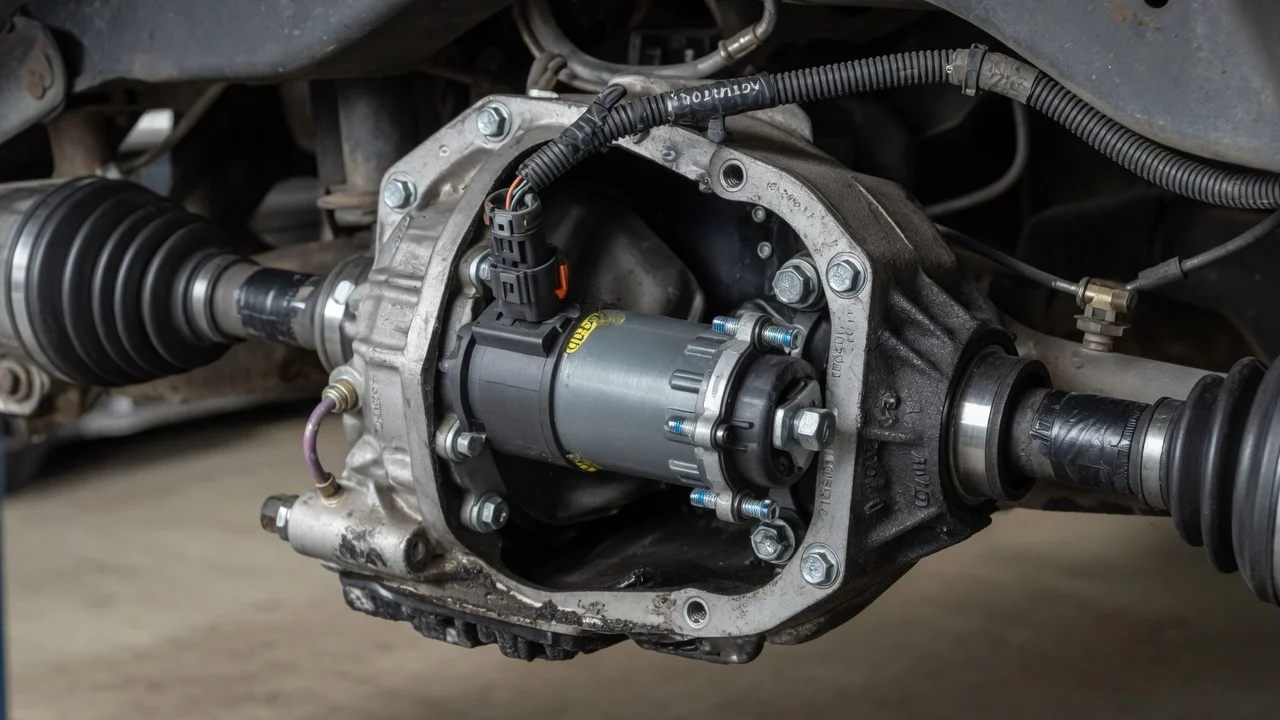
If the four-wheel-drive indicator on your 2005 GMC Envoy flashes, or the front wheels never seem to pull, the front axle actuator is a common suspect. Buying the right replacement depends on how your truck was built. This guide explains which Envoys use the actuator, how it engages the front axle, which details decide fitment, and how to confirm the part before you order.
Which 2005 Envoys use a front axle actuator
The front axle actuator only exists on Envoys built with a four-wheel-drive system that can disconnect the front axle. Two-wheel-drive trucks have no front differential, so they have no actuator. On four-wheel-drive models, the actuator mounts to the front differential housing. It is part of the mechanism that couples the front axle to the differential so both front wheels can be driven. Replacement actuators are usually listed as fitting several model years of this platform, which shares many parts with related GM midsize SUVs. A broad listing still does not prove that a particular part matches your truck.
The reliable answer comes from the vehicle itself. Confirm the drivetrain, body style and build details with the VIN and with the regular production option codes on the service parts identification label, which GM normally places in the glove box. If those details match the supplier's catalog entry for the actuator, you can expect it to fit. If anything conflicts, resolve it before you order.
How the actuator engages the front axle
In two-wheel drive, one side of the front axle is disconnected from the differential. With that side free, the differential gears can turn without passing torque to the front wheels. The front wheels simply roll, and the front driveline does not have to turn with them.
When the driver selects a four-wheel-drive mode, the transfer case control system shifts the transfer case and commands the front axle actuator. The actuator moves a shift fork and sliding collar that lock the disconnected shaft to the differential, so both front wheels receive drive. If the shift does not complete, because the actuator has failed, lost power or is blocked by a worn collar or fork, the four-wheel-drive indicator may flash or stay off. The front wheels then stay undriven even though the transfer case may have shifted.
What changes the fitment answer
Drivetrain is the first divider. A selectable four-wheel-drive truck uses the actuator as described above. A configuration that drives the front axle full time may not use one in the same way, so confirm the system type from the option codes rather than from badges or the dash switch alone. Body style and engine matter too. The 2005 Envoy line included the standard wheelbase, the extended XL, the XUV and the Denali, with inline-six and V8 engines. Those differences can change front axle components and the service parts that apply.
Production timing can also matter. Manufacturers sometimes revise a part during a model year, and the change can show up as a different connector shape, pin count, harness routing or plunger length. Aftermarket units may cover a wider range of years than the original part. Compare the electrical connector, mounting points and overall shape of the new actuator with the one on your truck.
Operating conditions affect diagnosis as well as fitment. Road salt, water exposure and debris can damage the connector and wiring near the differential. Those faults produce the same symptoms as a dead actuator, so replacing the actuator alone will not cure them.
Practical steps before and after buying
Start with symptoms and records. Note when the problem appears: the indicator flashing, a service four-wheel-drive message, clicking or grinding from the front, or no front pull on loose surfaces. Check the service history for earlier actuator, wiring or front differential work. A previously replaced actuator can tell you which part was used. Read stored codes with a scan tool that can access the four-wheel-drive or transfer case module, because a generic engine-code reader may not show them.
Do a visual inspection before buying parts. Look at the actuator connector and harness for corrosion, broken locking tabs, chafed insulation or damage from road debris. Check the front differential fluid level and condition against the manufacturer specifications for your truck. Contaminated or very low fluid points to a wider problem than the actuator. When the replacement arrives, compare it side by side with the original before installing it. Follow the factory service procedure for mounting and torque.
After installation, clear any stored codes and test engagement at low speed on a safe, loose surface where wheel slip is harmless. Confirm that the indicator behaves normally and that the front wheels actually pull. If you are servicing the front axle anyway, use the interval in your owner's maintenance schedule rather than a general rule of thumb.
Limitations and when to get help
Model year alone cannot settle fitment, and a general guide cannot verify a specific part number for your truck. The VIN, option codes and the supplier's catalog have to agree. A new actuator also cannot fix a worn shift collar, a damaged fork, a wiring fault or a transfer case problem. If the symptoms continue after replacement, the cause is likely elsewhere in the system.
If the codes point to a circuit fault, the connector and actuator look sound, or you cannot match the part confidently, take the VIN to a dealer parts counter or a qualified shop. They can confirm the correct actuator for your exact configuration and diagnose the four-wheel-drive system with the proper equipment. That step costs far less than buying the wrong part or replacing a good one.